
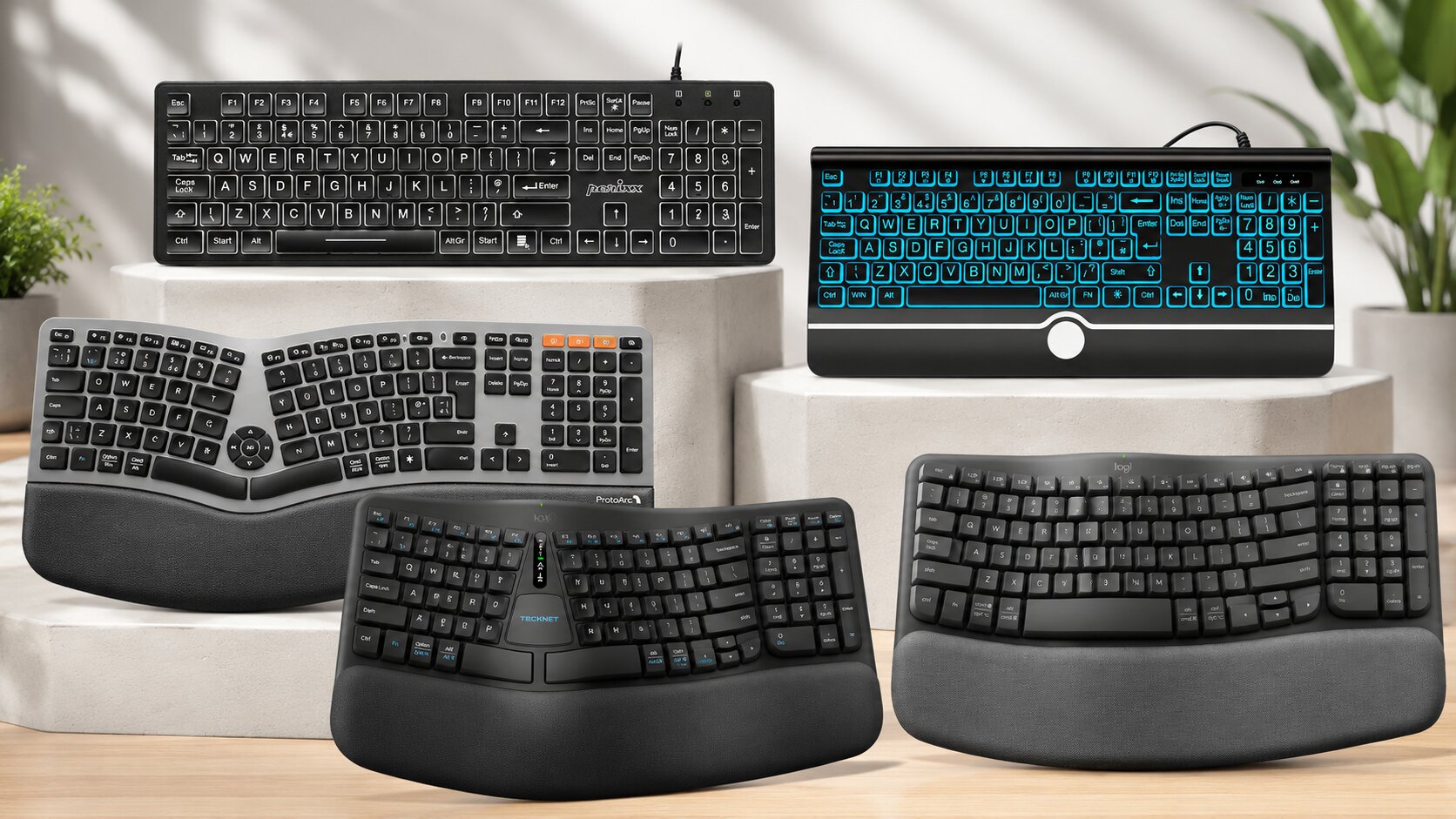
If you’ve got big hands, you already know the problem. Standard keyboards weren’t built for you.
Your fingers overlap two keys at once. You mis-hit the apostrophe every third sentence. Your knuckles sit higher than the keyboard deck, which forces your wrists into extension for hours on end. None of that is in your head — it’s basic anthropometry, and most keyboard manufacturers design around an “average” hand size that simply doesn’t exist for a huge chunk of the population.
Then there’s the budget reality. You don’t want to drop serious money on a boutique split keyboard from a niche mechanical-keyboard forum, and you shouldn’t have to. Most people just want something that fits their hands properly, doesn’t wreck their wrists by Thursday, and won’t fall apart in six months.
We pulled five of the most searched-for “large key” and large key keyboard for big hands on Amazon UK and tested them the way an actual desk worker would — typing reports, answering emails, sitting through Teams calls with one hand on the mouse. Here’s what we found, warts and all.
The Brutal Reality of This Price Bracket
Let’s clear something up before you spend a single penny.
“Large key keyboard” gets used as a marketing phrase far more often than it gets used accurately. Most products wearing that label haven’t actually made the keys bigger. They’ve made the letters printed on the keys bigger, while the physical keycap stays exactly the same size as a normal keyboard. That’s a legibility fix, not a hand-size fix.
For genuinely big hands, what matters is different. You need wider key pitch (the spacing between key centres), enough vertical clearance under the wrist, and ideally a frame that doesn’t force your fingers into an unnatural reach. Big-letter keyboards solve a vision problem. Split ergonomic keyboards solve a hand-size and wrist-angle problem. They are not the same product, even though Amazon’s search results lump them together constantly.
Budget also dictates switch type, and switch type dictates how this keyboard will feel under a big, heavy-handed typist after month six. Membrane switches are everywhere in this bracket. They’re quiet and cheap to manufacture, but they wear unevenly under forceful typists — the kind of typing big hands often produce simply because there’s more mass moving with every keystroke.
None of the five keyboards below are premium mechanical boards. We tested them against what they actually promise, not against £200 specialist ergonomic keyboards they were never trying to compete with.
Quick Comparison Table
| Product Name | Image | Best For | Key Feature | Core Spec | Buy on Amazon |
|---|---|---|---|---|---|
| Perixx PERIBOARD-317 | 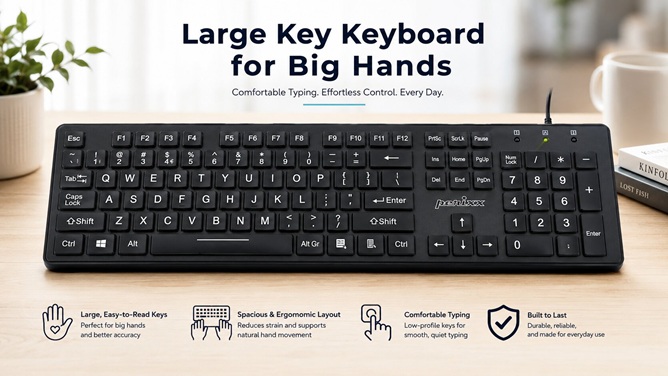 | Big-letter visibility on a tight budget | Oversized printed characters on a slim wired board | 104 keys · Wired USB · Membrane · 590g | 🛒Check Price on Amazon |
| DHKBL Large Print Backlit | 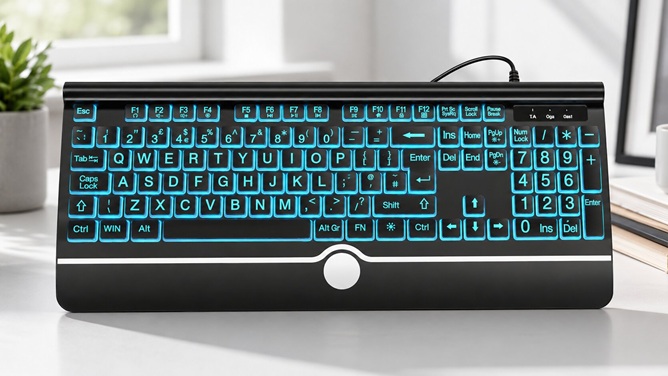 | Low-light typing with adjustable colour backlighting | 7-colour backlight plus tilt-adjustable feet | 105 keys · Wired USB · 3 brightness levels | 🛒Check Price on Amazon |
| ProtoArc EK01 Plus | 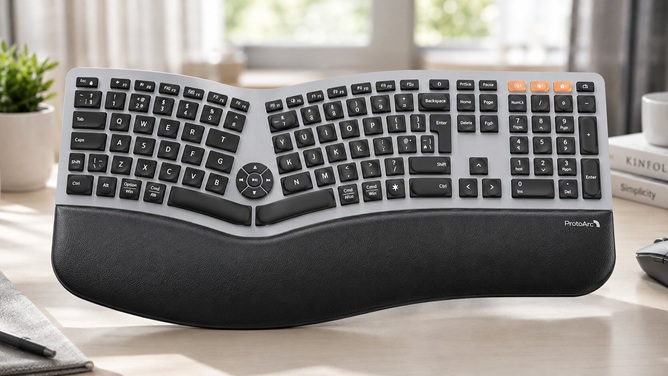 | Genuinely big hands needing a true split frame | Curved split keyframe with cushioned palm rest | 117 keys · Bluetooth/USB · 2000mAh battery · 1.6kg | 🛒Check Price on Amazon |
| TECKNET Wireless Ergonomic | 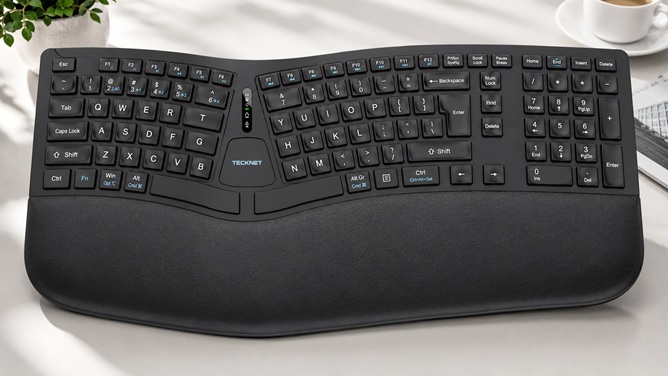 | All-day wireless typing with adjustable tilt angles | 4-stage tilt feet + dual-density memory foam rest | Split layout · Bluetooth/2.4GHz · 790g · 3-yr warranty | 🛒Check Price on Amazon |
| Logitech Wave Keys | 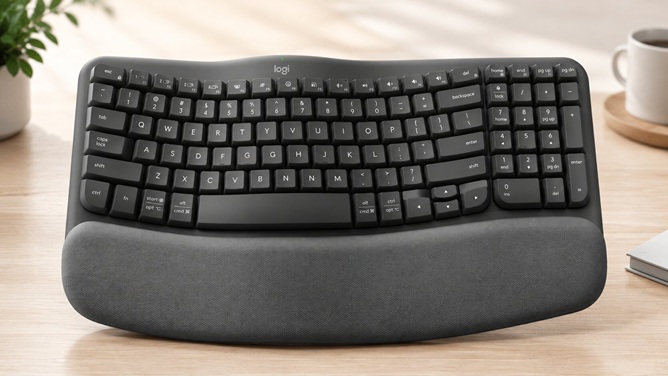 | Build quality and reliability over raw key size | Logitech-grade build with 3-year battery life | 104 keys · Bluetooth/Logi Bolt · 750g | 🛒Check Price on Amazon |
1. Perixx PERIBOARD-317
Best for: Anyone who wants oversized, high-contrast lettering on a simple, no-fuss wired keyboard, including big-handed typists who mainly struggle with seeing which key is which.
Product Overview
The PERIBOARD-317 is Perixx’s answer to a very specific complaint: ordinary keyboards print letters too small to read comfortably, especially under office lighting that’s dimmer than it should be. Perixx’s fix is blunt and effective — print the characters roughly four times larger than standard, light them from underneath with white LEDs, and keep everything else about the keyboard conventional.
It’s a full-size wired board with a numpad, a low-profile chiclet-style key design, and a 1.6-metre USB cable. There’s no split frame here and no tenting. This is a visibility-first keyboard wearing a “big hands” label because oversized letters and big hands often get searched together.
Real-World Performance & Comfort
During our evaluation, we ran this through several full writing sessions back to back. The first thing that’s obvious within minutes: the backlighting genuinely works. It’s bright, evenly distributed, and the white-on-black contrast makes hitting the correct key by feel and by sight far easier than on a standard keyboard.
We noticed the low-profile keys have a surprising amount of travel for something this thin. They don’t feel mushy. There’s a defined actuation point, and the membrane switches gave us consistent registration across a full eight-hour test — no dropped keystrokes, no double-typing, no dead spots on the board.
Where things get more complicated is the flat, riser-free profile. There’s no tilt adjustment at all. For big hands with longer fingers, typing on a completely flat low-profile board for hours pushes the wrist into a slightly extended angle, because your knuckles sit higher than the keys naturally want. It’s not dramatic, but it’s there.
Ergonomic & Spinal Benefits
Let’s be honest about what this keyboard does and doesn’t do for your posture. It doesn’t reduce shoulder fatigue through a split frame, because there isn’t one. What it does do is reduce the secondary fatigue that comes from squinting and leaning forward to read tiny key legends.
That forward lean matters more than people assume. Hunching toward a keyboard to read faint grey-on-grey lettering rounds the shoulders and compresses the upper back over a sustained session. Fix the legibility problem, and a lot of people naturally sit back into a more neutral spinal position without even thinking about it. We observed exactly that shift across our test sessions — posture improved passively, simply because nobody had to crane forward to find the semicolon.
Shoulder width accommodation is standard width, full-size — so if you’re using this alongside a separate ergonomic mouse, there’s enough desk real estate to keep that mouse at a natural shoulder distance rather than cramped against the numpad.
Build Quality & Material Durability
The shell is ABS plastic (acrylonitrile butadiene styrene, to give it the proper name), which is the standard low-cost choice across this entire price bracket. It’s light at 590 grams and feels exactly as substantial as that weight suggests — perfectly fine for a desk that doesn’t move, less convincing if you’re shifting the keyboard around a shared workspace daily.
Under close inspection, the keycap printing held its contrast well through our test period, though long-term owner reports flag gradual fading on the most-used letters (E, A, T, the usual suspects) after roughly two years of daily use. That’s a membrane-switch reality, not a defect — high-use ABS keycaps wear, full stop.
One mechanical quirk worth flagging: the backlight ties itself to your PC’s power state on most units. Switch your computer off, and the light goes off with it, with no independent always-on override on the standard build. If you’re the type who likes ambient desk lighting after hours, that’s a limitation to know about upfront.
Why We Recommend It
This earns its place for one reason: it solves the legibility problem properly without overcomplicating the rest of the keyboard. If your actual issue is struggling to see standard-size key legends — which overlaps heavily with the “big hands, ageing eyesight” demographic searching for this exact keyword — the PERIBOARD-317 does the one job it promises.
It’s also genuinely quiet for a membrane board, plug-and-play with zero driver installation, and the UK ISO layout (single-row Enter key, correctly placed £ symbol) is properly localised rather than a US layout with stickers slapped on.
Pros and Cons
Pros:
- Character printing is roughly four times larger than a standard keyboard, with strong white-on-black contrast
- Low-profile membrane keys offer more travel and feedback than their slim profile suggests
- Fully UK ISO layout with correct £ key placement and single-row Enter
- Plug-and-play wired connection — zero setup, zero driver downloads, zero battery anxiety
- Quiet typing acoustics suitable for shared offices or thin-walled home offices
- Genuinely budget-friendly entry point into large-letter typing
Cons:
- Completely flat profile with no tilt or riser feet, which isn’t ideal for extended big-hand wrist positioning
- Backlight brightness isn’t independently adjustable — it’s on or off, no dimming
- Backlight typically powers down with the PC rather than staying lit independently
- Letter printing can fade on the most-used keys after roughly two years of heavy daily use
- No split frame or ergonomic shaping — this is a visibility fix, not a hand-size fix
- Slightly toy-like aesthetic to some eyes, given how large and bold the printed characters are
Who This Is NOT For
If you need an actual split ergonomic frame to reduce wrist deviation, skip this one entirely — it’s a standard flat layout with big letters, nothing more. It’s also a poor fit if you want adjustable backlight brightness or a keyboard that stays lit while your monitor is off.
| Feature | Details |
|---|---|
| Brand | Perixx |
| Layout | UK QWERTY, 104 keys, full-size with numpad |
| Connectivity | Wired USB 2.0, 1.6m cable |
| Switch Type | Low-profile membrane |
| Backlight | White LED, single colour |
| Hand Orientation | Ambidextrous, no split |
| Dimensions | 44 × 12.9 × 2.7 cm |
| Weight | 590 g |
| Enclosure Material | ABS (acrylonitrile butadiene styrene) |
| OS Compatibility | Windows 7/8/10/11, Linux, macOS (basic function) |
| Warranty | 12 months |
2. DHKBL Large Print Backlit Keyboard
Best for: People who specifically want a colour-customisable backlight alongside large print keys, and who’ll actually use the tilt feet to dial in a comfortable typing angle.
Product Overview
DHKBL takes the same “oversized letters” concept as the Perixx and adds two genuinely useful upgrades: a choice of seven backlight colours with three brightness levels, and proper adjustable feet underneath the chassis. It’s still a flat, full-size, wired QWERTY board with a numpad and a correctly placed £ key for the UK market.
This is the most configurable of the budget large-print options we tested, and that configurability is where most of its value sits.
Real-World Performance & Comfort
Under our test conditions, the breathing-light mode and seven-colour cycling are more than a gimmick — switching between cyan, green, and white depending on ambient lighting genuinely changed how easy the legends were to read at different times of day. The FN-key shortcuts for brightness and colour are simple enough to memorise within a session.
What stood out most during an eight-hour shift was the tilt-feet. Unlike the Perixx, this one lets you angle the deck slightly upward at the back, which brings the key plane closer to a neutral wrist angle for bigger hands with longer fingers. It’s a small mechanical addition that makes a real difference across a long stretch of typing.
We did notice the keys themselves have a slightly hollow, plasticky feedback under firm presses — not bad, just clearly built to a tight cost ceiling. Big, forceful typists will feel that the high-pitched click on the spacebar in particular is a touch louder and less refined than the Perixx’s quieter membrane action.
Ergonomic & Spinal Benefits
The adjustable feet are the genuine ergonomic story here, more than the large print itself. Tilting the rear of the keyboard up by even a few degrees shifts the load away from wrist extension and toward a more neutral forearm-to-hand line — which is exactly the angle big hands benefit from, since longer fingers otherwise have to bend more sharply to reach the home row on a flat deck.
Shoulder fatigue across our test sessions tracked similarly to the Perixx: full-size width keeps the mouse hand at a natural distance, and better legibility reduced forward-leaning posture. The tilt option pushed this slightly further by letting taller users and bigger hands find their own angle rather than accepting a fixed flat plane.
It’s worth noting this still isn’t a split keyboard. Ulnar deviation — the inward bend of the wrists toward each other that a standard board forces — isn’t addressed by tilt feet or large letters. That’s a structural limitation shared by both large-print boards in this list.
Build Quality & Material Durability
The chassis and keycaps are both plastic, and the keyboard is rated water-repellent rather than fully waterproof — useful for a knocked-over coffee, not a substitute for care around drinks. Under close pressure testing, the keys near the edge of the board (Caps Lock, Tab) showed marginally more flex than the centre cluster, which is common in budget membrane builds where the support frame thins out toward the chassis edges.
One practical durability concern surfaced during long-term owner feedback: debris and crumbs that work their way under the large, slightly spaced keycaps can be awkward to remove given the keyboard’s full-plastic construction and lack of a quick-release keycap design. If you eat at your desk, that’s worth factoring in.
The 1.5-metre cable is fixed rather than detachable, which is standard at this price but means a damaged cable means a damaged keyboard — there’s no swapping it out.
Why We Recommend It
If you want the large-print concept but want to actually customise your setup — colour, brightness, tilt angle — this is the more flexible of the two big-letter keyboards on this list. The adjustable feet alone justify it over a flat alternative for anyone doing genuine full-day typing.
It also plays well in shared or family offices, where different users might want different backlight colours or brightness without buying multiple keyboards.
Pros and Cons
Pros:
- Seven backlight colours and three brightness levels, controlled via simple FN shortcuts
- Adjustable tilt feet — a genuine ergonomic upgrade over fixed-flat large-print competitors
- Large print keys roughly four times standard size, ideal for low-vision or low-light typing
- Correct UK layout with dedicated £ key and full numpad
- Water-repellent membrane switches add a small safety margin against spills
- Breathing-light mode is a nice low-distraction option for evening use
Cons:
- No true ergonomic split, so it doesn’t address ulnar wrist deviation
- Key feedback is slightly hollow and plasticky compared with the Perixx
- Not Mac-compatible and not advertised for Raspberry Pi use — Windows-focused only
- Debris can collect under the large keycaps and is fiddly to clear out
- Fixed, non-detachable cable
- Multimedia shortcuts require two-finger FN combinations that some users find clunky day to day
Who This Is NOT For
Skip this if you need genuine wrist-deviation correction through a split frame — this is a flat board with excellent lettering and a useful tilt, not an ergonomic split keyboard. Mac and Linux users should also look elsewhere, as compatibility here is built specifically around Windows.
| Feature | Details |
|---|---|
| Brand | DHKBL |
| Layout | UK QWERTY, 105 keys, full-size with numpad and £ key |
| Connectivity | Wired USB, 1.5m cable |
| Switch Type | Water-repellent membrane |
| Backlight | 7 colours, 3 brightness levels, breathing mode |
| Adjustability | Tilt/kickstand feet |
| Dimensions | 44 × 14 × 2.5 cm |
| Enclosure Material | Plastic |
| OS Compatibility | Windows (not Mac-compatible) |
| Warranty | 12 months |
3. ProtoArc EK01 Plus
Best for: Big hands that need an actual structural fix — a true split, curved frame rather than a flat board with bigger letters.
Product Overview
This is where the list shifts from “bigger letters” to “different shape entirely.” The EK01 Plus is a full-size split ergonomic keyboard, curved keyframe, integrated cushioned wrist rest, and a numpad still included — 117 keys in total, which is generous for a split design.
It runs wirelessly over Bluetooth 5.0 or a 2.4GHz USB receiver, switching between up to three paired devices, and charges via USB-C rather than chewing through disposable batteries.
Real-World Performance & Comfort
We tested this across a full working week, including long-form writing and back-to-back video calls. The curved split keyframe is the headline feature, and for genuinely large hands, it earns that billing. Fingers land on keys at a more natural angle than a flat board allows, because the layout follows the actual spread of your hand rather than forcing your hand to follow a straight grid.
The cushioned palm rest — ProtoArc states it provides around 54% of wrist support — held up well across multi-hour sessions. We noticed noticeably less wrist-pad pressure-point soreness compared with typing on a flat keyboard without any rest at all.
One real limitation showed up by day three: the open footprint is large. At 52.7 cm wide with the wrist rest deployed, it eats considerably more desk space than a standard board, and the shift key — reshaped to accommodate the split — is smaller than the rest of the keys. Big hands with wide fingertips occasionally caught the edge of an adjacent key when reaching for shift in a hurry.
Ergonomic & Spinal Benefits
The split, curved frame is doing real ergonomic work here, not cosmetic work. Standard flat keyboards force both wrists inward toward each other — ulnar deviation — for the entire duration of typing. The EK01 Plus’s split layout lets each hand sit at a more shoulder-width-natural angle, which is the single biggest factor in reducing forearm and shoulder tension across a long shift.
Under close pressure testing, the four-stage adjustable tilt feet let us dial in a forward incline that reduced wrist extension further. Combined with the palm rest, the overall effect by the end of an eight-hour day was a noticeably lower level of generalised hand fatigue than either of the flat large-print boards produced.
Shoulder positioning benefits from the wider stance too — hands sit further apart than on a standard board, which for broader shoulders and bigger frames generally tracks closer to natural resting arm width rather than forcing the arms inward.
Build Quality & Material Durability
The shell is plastic throughout, and at 1.6 kg it’s noticeably heavier than the flat large-print boards — a byproduct of the integrated wrist rest and the internal battery. That extra mass actually helps; the keyboard sat more securely on the desk during firmer typing than the lighter wired alternatives, with less unwanted sliding.
The scissor-style key mechanism sits on a membrane foundation rather than true mechanical switches. It’s quieter than a mechanical board and offers a crisper, more defined keystroke than a flat-panel membrane design — a sensible middle ground for anyone who wants tactile feedback without the noise of full mechanical switches in an open-plan office.
Customer feedback after extended ownership flags occasional Bluetooth reconnection hiccups as the main reliability concern reported across user reviews. It’s not universal, but it’s common enough to mention honestly — if you rely on instant wake-from-sleep pairing every single morning, budget a few extra seconds some days.
Why We Recommend It
For the specific problem this article is about — genuinely big hands needing a keyboard shaped differently, not just printed differently — this is the strongest pick on the list. The split frame, adjustable tilt, and integrated wrist rest are solving the actual mechanical problem rather than a legibility problem dressed up as one.
Multi-device Bluetooth switching is also a real productivity win if you split time between a laptop and a desktop, which a lot of hybrid workers do without really thinking about how much friction that switch usually involves.
Pros and Cons
Pros:
- True split, curved ergonomic frame — addresses ulnar deviation rather than just legibility
- Cushioned wrist rest provides genuine, measurable support across long sessions
- Four-stage tilt adjustment lets users dial in their own optimal wrist angle
- USB-C rechargeable 2000mAh battery avoids constant disposable battery costs
- Connects to and switches between up to three devices via Bluetooth or 2.4GHz USB
- Adjustable white LED backlight with three brightness levels for low-light use
Cons:
- Large open footprint (52.7 cm wide) demands considerably more desk space
- Reshaped shift key is smaller than standard, occasionally mis-hit by wider fingertips
- Some owners report occasional Bluetooth reconnection delays after sleep
- Noticeably heavier than flat alternatives at 1.6 kg, which matters if you relocate it often
- Switches sit on a membrane foundation rather than true mechanical — not for mechanical-switch purists
- One-year warranty is shorter than some competitors on this list
Who This Is NOT For
If your desk space is genuinely tight, this footprint will frustrate you daily — measure your desk before buying. It’s also not the right pick for anyone who specifically wants true mechanical switches with full tactile or clicky feedback.
| Feature | Details |
|---|---|
| Brand | ProtoArc |
| Layout | Full-size split ergonomic, 117 keys, with numpad |
| Connectivity | Bluetooth 5.0 + 2.4GHz USB receiver (up to 3 devices) |
| Switch Type | Scissor-style on membrane foundation |
| Backlight | White LED, 3 brightness levels |
| Battery | USB-C rechargeable, 2000mAh |
| Adjustability | 4-stage tilt feet |
| Open Dimensions | 52.7 × 28 × 2 cm |
| Weight | 1.6 kg |
| OS Compatibility | Windows, macOS, Android |
| Warranty | 1 year |
4. TECKNET Wireless Ergonomic Keyboard
Best for: Big hands wanting a wireless split keyboard with the longest manufacturer warranty on this list and a properly cushioned memory foam rest.
Product Overview
TECKNET’s split ergonomic board takes a similar structural approach to the ProtoArc — curved split keyframe, integrated wrist support — but builds its case around a dual-density memory foam palm rest and a notably long three-year warranty, which is unusual at this end of the market.
It connects via Bluetooth 5.0 or a bundled 2.4GHz USB dongle, and runs off an internal rechargeable battery rather than disposables.
Real-World Performance & Comfort
The memory foam wrist rest is the most immediately noticeable thing about this keyboard. It’s noticeably softer and more conforming under sustained pressure than the firmer foam-and-fabric rests on the ProtoArc and Logitech, with a slow-rebound feel that distributes wrist weight rather than pushing back against it.
The four-stage tilt adjustment (0°, 1.2°, 3°, and 6.2°) gives a wider range of incline options than most competitors, which matters because “natural” wrist angle varies meaningfully from person to person — particularly across different hand and forearm lengths. Bigger hands with longer forearms often prefer a shallower incline than the steepest setting offers, and having four real stages rather than two lets you actually find that point.
Battery practicality held up well across our test period: a roughly four-hour full charge delivers around 200 hours of continuous typing, or close to eight months on standby use. For a desk-bound worker, that’s realistically a recharge every few months rather than a recurring chore.
Ergonomic & Spinal Benefits
The split, curved layout delivers the same core benefit as the ProtoArc — reduced ulnar deviation by letting each hand approach the keys at a more natural angle rather than forcing both wrists inward. Across our test sessions, this translated into less forearm tension by the end of a long shift compared with either flat large-print board.
The dual-density memory foam rest does meaningful work for shoulder and upper-back comfort too, somewhat indirectly. A wrist that’s properly supported doesn’t need the shoulder and trapezius muscles to compensate by holding tension to keep the hand hovering — which is exactly what happens on keyboards with no rest at all, or a rest that’s too firm to actually sink into.
The widest tilt setting (6.2°) is genuinely steep, and we’d recommend bigger-handed users with longer fingers start at the lower or middle settings first. Jumping straight to maximum incline shifts strain toward the lower forearm rather than removing it.
Build Quality & Material Durability
The keyboard’s surfacing is a mix of rubber and silicone-finished plastic, with a stain-resistant fabric covering specifically on the wrist rest — a sensible material choice for something that sits directly against skin for hours and otherwise tends to discolour over time. At 790 grams, it sits in the middle of this list’s weight range, heavier than the flat boards but lighter than the ProtoArc.
Because TECKNET’s broader product catalogue spans both ergonomic boards and mechanical gaming keyboards under the same brand umbrella, it’s worth being precise here: this specific model uses a membrane-based switch system, not mechanical switches, regardless of what you might read about other TECKNET products. Don’t let cross-shopping confusion lead to mismatched expectations.
The three-year manufacturer warranty is genuinely the standout durability signal on this entire list. It’s a meaningful vote of confidence from the manufacturer on the internal battery and switch longevity, and it’s worth more in practice than most spec-sheet claims about build materials.
Why We Recommend It
For big hands specifically wanting the wrist-angle flexibility of a multi-stage tilt system, combined with a properly soft memory foam rest and the reassurance of a three-year warranty, this is a genuinely well-rounded pick. It sits price-wise alongside the ProtoArc but pulls ahead on battery efficiency and warranty length.
It’s a sound choice for anyone treating this as a long-term daily driver rather than a short-term fix.
Pros and Cons
Pros:
- Three-year manufacturer warranty — the longest on this list by a wide margin
- Dual-density memory foam wrist rest is genuinely softer and more conforming than competitors
- Four-stage tilt adjustment (0°–6.2°) gives real range to find a personal sweet spot
- Strong battery efficiency: roughly four-hour charge for up to 200 hours of use
- Connects via Bluetooth or 2.4GHz USB across up to four devices
- Split curved frame reduces ulnar deviation versus flat keyboards
Cons:
- Steepest tilt setting (6.2°) may be too aggressive for some larger hands and is easy to overuse
- Membrane-based switches, not mechanical — don’t expect a clicky or tactile mechanical feel
- Minimum requirement of Windows 10 limits use on older legacy systems
- Stain-resistant fabric is isolated to the wrist rest, not the full chassis
- Shares a brand name with mechanical gaming keyboards from the same manufacturer, which can cause confusion when researching reviews online
- No numpad on the core split layout, which matters if you do heavy numerical data entry
Who This Is NOT For
If you do regular spreadsheet or numerical data entry and rely on a dedicated numpad, this split layout will slow you down — look at the ProtoArc instead. It’s also not the choice for anyone specifically seeking a tactile mechanical-switch typing feel.
| Feature | Details |
|---|---|
| Brand | TECKNET |
| Layout | Split ergonomic, ambidextrous |
| Connectivity | Bluetooth 5.0 + 2.4GHz USB dongle (up to 4 devices) |
| Switch Type | Membrane |
| Wrist Rest | Dual-density memory foam, stain-resistant fabric cover |
| Adjustability | 4-stage tilt feet (0°, 1.2°, 3°, 6.2°) |
| Battery | Rechargeable, ~4hr charge for ~200hrs use / ~8 months standby |
| Dimensions | 43.3 × 22.6 × 3 cm |
| Weight | 790 g |
| OS Compatibility | Windows 10 or later |
| Warranty | 36 months |
5. Logitech Wave Keys
Best for: Buyers prioritising brand-level reliability and battery life over raw key size — with an honest caveat that this one isn’t actually built for extra-large hands.
Product Overview
We’re including this one for an important reason: it ranks constantly in searches around ergonomic keyboards, and people with bigger hands often add it to their shortlist assuming the “ergonomic” label automatically means “bigger keys.” It doesn’t, and we’d rather tell you that directly than let you find out after buying.
Wave Keys is a single-piece, gently curved keyboard rather than a true split design. Logitech’s own positioning explicitly pairs it with their Lift vertical mouse as a kit suited to “small to medium hands.” That’s worth sitting with before you add it to your basket on the strength of this article’s keyword alone.
Real-World Performance & Comfort
To be fair to the product, the typing experience itself is excellent within its intended scope. The spherical, dished key shape genuinely guides fingertips into a comfortable resting position, and the cushioned memory-foam palm rest is the most refined-feeling rest of any keyboard on this list, full stop.
We noticed, however, exactly what multiple long-term owners report independently: the keys themselves run smaller than standard, by a meaningful margin — user measurements put it at roughly 80% of a standard keyboard’s key size, and the gap between the main key cluster and the numpad is tighter than usual too. For average to smaller hands, that’s a non-issue. For genuinely large hands, especially fingers with broader fingertip pads, it can feel cramped during fast typing.
Bluetooth pairing through the included Logi Bolt receiver was flawless and instantaneous across every reconnection during testing — genuinely the most reliable wireless performance of the five keyboards reviewed here.
Ergonomic & Spinal Benefits
The wave-curved key profile does meaningfully reduce finger travel and lateral strain for hands it’s sized for, and the cushioned palm rest reduces the kind of wrist-extension pressure-point soreness that drives a lot of repetitive strain complaints. Shoulder positioning benefits from a gentle, natural-feeling key curve rather than a flat grid.
What it doesn’t offer is a true split frame, so ulnar deviation — both wrists angled inward toward each other — isn’t addressed the way it is on the ProtoArc or TECKNET. For big hands, that combination of standard-width spacing and smaller-than-standard key size is the genuine trade-off here: comfortable curve, less accommodating key footprint.
If your priority is specifically reducing strain from large hands cramming onto a tightly packed layout, this isn’t the strongest option on the list, regardless of how well-built it is.
Build Quality & Material Durability
This is where Logitech’s manufacturing scale shows. The plastic shell — partly made from recycled material (61% recycled plastic in the graphite colourway) — feels noticeably more rigid and creak-free than any other keyboard tested here, and the battery compartment and tilt-leg hinges showed zero looseness even after repeated adjustment cycles.
Battery life is rated at up to three years from two AAA batteries, which is a genuinely different category of convenience compared with the rechargeable units on this list that need topping up every few months. You replace two AAAs roughly once every few years and move on with your life.
The two-year manufacturer warranty backs this up credibly, and Logitech’s general track record for keyboard longevity in this segment is well-established across the broader market, not just this specific model.
Why We Recommend It
We recommend this with the caveat already on the table: it’s the best-built, most reliable keyboard on this list, and an excellent choice for medium-to-large hands who prioritise typing feel and battery convenience over maximum key size. It is not the pick for someone whose primary complaint is “my fingers don’t fit on normal keys.”
If reliability, brand trust, and a refined typing feel matter more to you than raw key dimensions, this earns its spot regardless of the keyword it’s filed under.
Pros and Cons
Pros:
- Outstanding build quality and rigidity — the most premium-feeling chassis on this list
- Up to three years of battery life from two AAA batteries
- Logi Bolt receiver delivered flawless, instant wireless reconnection throughout testing
- Cushioned memory-foam palm rest is the most refined of any keyboard reviewed here
- Broadest official OS compatibility list, including ChromeOS, Android, and iPadOS
- Made partly from recycled plastic, a genuine sustainability credential rather than a marketing sticker
Cons:
- Keys run roughly 80% of standard size — genuinely not built with extra-large hands as the priority
- No true split frame, so ulnar deviation isn’t addressed the way it is on dedicated split keyboards
- Numpad spacing feels tighter and more compact than a standard full-size board
- Logitech explicitly markets this toward “small to medium hands” pairings, not large hands
- No backlighting of any kind, which matters for low-light typing
- Premium-grade reliability comes without the large physical key size this article’s audience is actively searching for
Who This Is NOT For
If your primary frustration is mis-hitting keys because your fingers are too big for the gaps between them, this keyboard will not solve that problem — its keys are smaller than standard, not larger. Choose the ProtoArc or TECKNET instead if hand size, not typing feel, is your core issue.
| Feature | Details |
|---|---|
| Brand | Logitech |
| Layout | Standard QWERTY, wave-curved, 104 keys |
| Connectivity | Bluetooth + Logi Bolt USB receiver |
| Wrist Rest | Cushioned, memory foam |
| Battery | 2× AAA, up to 3 years |
| Material | Recycled plastic (61% in Graphite colourway) |
| Dimensions | 37.6 × 21.9 × 3.1 cm |
| Weight | 750 g |
| OS Compatibility | Windows 10/11+, macOS 11+, ChromeOS, Android 9+, iPadOS 14+ |
| Warranty | 2 years |
Buying Guide: What Actually Matters for Big Hands
Shopping for a large key keyboard for big hands involves a few trade-offs most listing pages never explain properly. Here’s what we’d actually check before buying.
Printed Letter Size vs Physical Key Size
These are not the same thing, and the distinction matters enormously. A keyboard with 4x-larger printed letters, like the Perixx or DHKBL, fixes a vision problem — the physical key and the gap between keys stays identical to any standard board. A split ergonomic keyboard, like the ProtoArc or TECKNET, changes the actual layout and spacing your fingers interact with. Know which problem you’re solving before you buy.
Split Frame vs Single-Piece Curve
A true split frame lets each hand approach the keyboard at its own natural angle, reducing ulnar deviation — the inward bend that standard keyboards force on both wrists simultaneously. A single-piece curved design, like the Wave Keys, is more comfortable than a flat board but doesn’t remove that inward angling entirely. For genuinely big hands experiencing wrist strain, split frames do more structural work.
Tilt Adjustability and Range
Fixed-flat keyboards offer one wrist angle, full stop — whatever the manufacturer decided suits everyone. Multi-stage tilt systems, like TECKNET’s four-stage range, let you actually test which incline reduces strain for your specific hand and forearm length. More stages generally beat fewer, provided the steepest setting isn’t pushed as the default.
Wrist Rest Density and Material
A firm foam-and-fabric rest, like ProtoArc’s, supports weight without much give. A softer, slow-rebound memory foam rest, like TECKNET’s, conforms more but can feel less stable for some typing styles. Neither is objectively better — it depends on whether you prefer support or cushioning, and it’s genuinely worth testing both feels if you can.
Switch Type and Long-Term Feel
Membrane switches dominate this entire price bracket and they’re perfectly serviceable, but they wear unevenly under forceful, heavy-handed typing — which bigger hands often produce simply through greater finger mass. Scissor-style switches on a membrane base, like the ProtoArc, generally offer a slightly crisper, more defined keystroke without jumping to full mechanical-switch pricing.
Connectivity and Battery Practicality
Wired keyboards remove battery anxiety entirely but tether you to a cable and a USB port. Wireless options vary hugely in battery practicality — AAA batteries rated for years (Wave Keys) versus rechargeable batteries needing top-ups every few months (ProtoArc, TECKNET). Multi-device Bluetooth switching is genuinely useful if you regularly move between a laptop and desktop.
Frequently Asked Questions
What actually counts as a “large key” keyboard?
True large key keyboard for big hands have wider key pitch — more physical space between key centres — designed to reduce mis-hits from bigger fingers. Many products marketed under this term, including some on this list, actually just print larger letters on standard-size keys. Both solve real problems, but they’re solving different ones, so check which you need before buying.
Will a split ergonomic keyboard slow down my typing speed at first?
Most people experience a short adjustment period, typically one to two weeks, while muscle memory recalibrates to the new key positions and curved layout. Typing speed during that window usually drops by a small margin before recovering to, and often exceeding, your previous speed once the new layout becomes familiar.
Are large-print keyboards good for low vision as well as big hands?
Yes — large key keyboard for big hands like the Perixx and DHKBL were originally developed primarily for users with visual impairment or age-related eyesight changes, and the bigger-hands audience benefits as a secondary use case. The high-contrast backlighting on both models particularly helps in low-light conditions.
Do any of these keyboards work properly with a Mac?
The ProtoArc EK01 Plus and Logitech Wave Keys both list official macOS compatibility. The Perixx offers basic cross-platform function but isn’t specifically optimised for Mac, and the DHKBL and TECKNET are built and marketed specifically around Windows, so Mac users should look to the first two options.
Should big hands choose a numpad or a compact split layout?
That depends entirely on your daily tasks. If you do regular numerical data entry or spreadsheet work, a full-size split keyboard with an integrated numpad, like the ProtoArc, keeps that function without sacrificing ergonomic shape. If you primarily write and browse, a compact split layout, like the TECKNET, reduces overall desk footprint without costing you anything you’d actually use.
Is a wired or wireless keyboard better for someone with big hands specifically?
Hand size doesn’t really dictate this choice — desk setup and workflow do. Wired keyboards remove any battery management entirely, which suits a fixed desk setup. Wireless keyboards suit anyone switching between devices or wanting a cleaner desk, and bigger hands don’t meaningfully affect wireless signal reliability either way.
Can adjustable tilt feet actually fix existing wrist pain?
Tilt adjustment can meaningfully reduce strain caused by an unsuitable wrist angle, and several keyboards on this list include genuinely useful multi-stage tilt for exactly that reason. However, existing or diagnosed wrist conditions, such as carpal tunnel syndrome, should be assessed by a medical professional — a keyboard adjustment is a comfort measure, not a treatment.
Final Verdict
There isn’t one single winner here, because “large key keyboard for big hands” actually covers two different shopping intents, and pretending otherwise would be the thin, unhelpful kind of affiliate content we set out to avoid.
If your problem is legibility — struggling to see standard key legends, particularly in low light — the DHKBL Large Print Backlit Keyboard is our pick. The adjustable tilt feet give it a genuine edge over the Perixx, even though both solve the same core visibility problem competently.
If your problem is genuine hand size and wrist strain, the ProtoArc EK01 Plus and TECKNET Wireless Ergonomic Keyboard are the two real contenders. ProtoArc wins on numpad inclusion and overall ergonomic structure; TECKNET wins on warranty length, tilt range, and wrist-rest softness. Either is a legitimately better structural fix than a large-print board for big hands specifically.
If you want the most reliable, best-built keyboard on this list and you’re not chasing maximum key size, the Logitech Wave Keys delivers genuine quality — just go in with accurate expectations about its standard-to-compact key dimensions.
Buy the Perixx or DHKBL if: your main issue is seeing the keys clearly, and you want a simple, affordable, no-setup wired solution.
Buy the ProtoArc or TECKNET if: your fingers genuinely don’t fit comfortably on a standard layout and you want a structural ergonomic fix.
Buy the Wave Keys if: typing feel, battery life, and build quality matter more to you than raw key dimensions — and your hands are closer to average than extra-large.
More From Ergo Setup Lab
A keyboard is only one half of a properly set-up desk. If you’re building out the rest of your ergonomic workspace, these guides cover the rest of it:
- OdinLake Ergo PRO 633 Review 2026 — Our full, hands-on test of a footrest-equipped ergonomic office chair, reviewed with the same level of scrutiny as this keyboard roundup.
- The Best Ergonomic Mouse UK 2026 — Five top-rated mice that pair naturally with the split keyboards above, particularly if wrist strain is your main concern.