
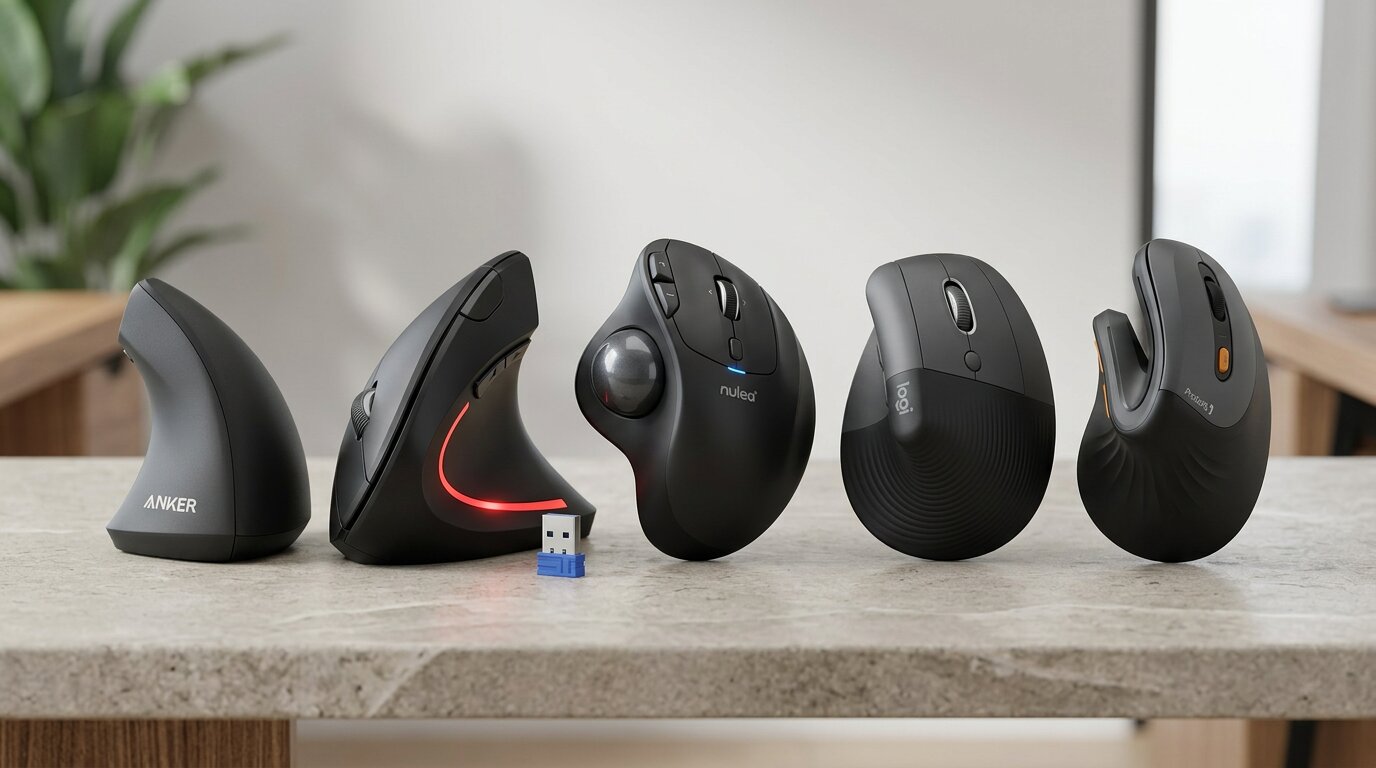
If your wrist aches after a long day at the keyboard, or you have started noticing tension creeping up your forearm by mid-afternoon, the mouse you are using deserves serious scrutiny. Most standard mice hold your hand in an unnatural palm-down position for hours on end — a posture that compresses the tendons in the wrist, increases forearm rotation, and puts persistent strain on muscles that were never designed to be held in tension all day.
An ergonomic mouse changes the geometry of that grip. By tilting the hand into a more neutral, handshake-style position — or redistributing control to the thumb in the case of trackball designs — a well-designed ergonomic mouse reduces the muscular load that builds up over a working day. For people with repetitive strain injury, carpal tunnel syndrome, or simply the accumulated discomfort of long computing sessions, the difference between a standard mouse and a proper ergonomic mouse can be genuinely transformative.
We have reviewed five of the best ergonomic mice available on Amazon UK right now, covering a range from affordable entry-level options to premium wireless designs built for serious daily use. Whether you work from a home office, hot-desk in a studio, or travel frequently with a laptop, there is an option on this list that will suit your setup.
Why a Vertical Ergonomic Mouse Changes How Your Wrist Feels
The problem with a conventional flat mouse is not immediately obvious — until you understand forearm anatomy. When the hand is positioned palm-down over a flat mouse, the two bones of the forearm (the radius and ulna) cross over one another. This pronation is a sustained, static tension that tightens the muscles running from the elbow to the wrist over the course of a full working day.
A vertical ergonomic mouse eliminates this by rotating the grip roughly 60 to 90 degrees, placing the hand in its natural resting position — the same position it falls into when hanging loosely at the side. In this orientation, the forearm bones sit parallel and uncrossed, reducing muscular load and allowing the soft tissue around the wrist to relax. For users already managing wrist pain or early-stage RSI, this reduction in tension can deliver noticeable relief within the first few working days.
Beyond the wrist, a good ergonomic mouse also reduces shoulder elevation and elbow strain, particularly in users who tend to grip their mouse tightly or move it with the shoulder rather than the wrist. The more neutral grip position encourages looser, lower-effort mouse control — the kind of effortless movement that does not accumulate into discomfort by Friday afternoon.
Quick Comparison: Best Ergonomic Mouse Options in the UK (2026)
| Product Name | Product Image | Key Feature | Connectivity | DPI Range | Buy Now |
|---|---|---|---|---|---|
| Anker 2.4G Wireless Vertical Ergonomic Optical Mouse | 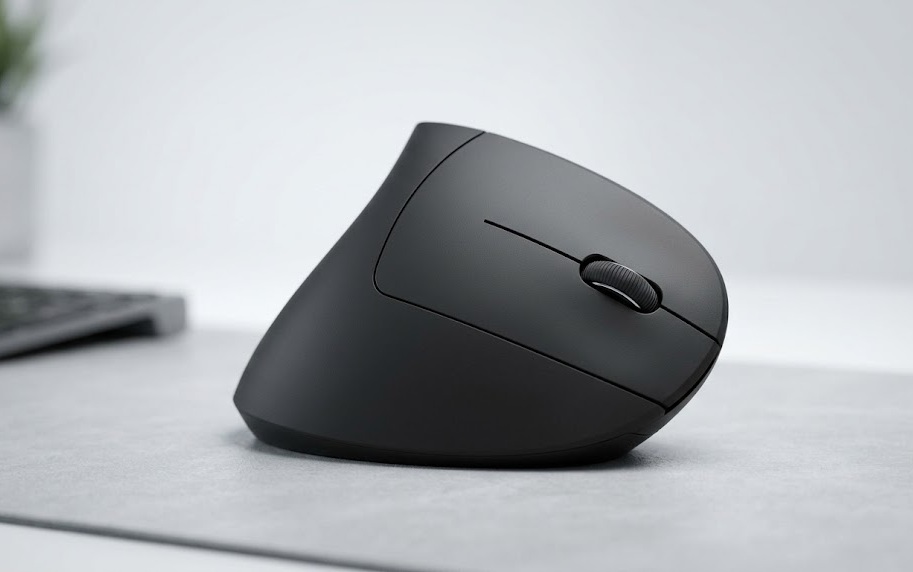 | Classic vertical grip at low cost | 2.4G Wireless | 800–1600 DPI | 🛒Check Price on Amazon |
| TECKNET Ergonomic Mouse 4800DPI | 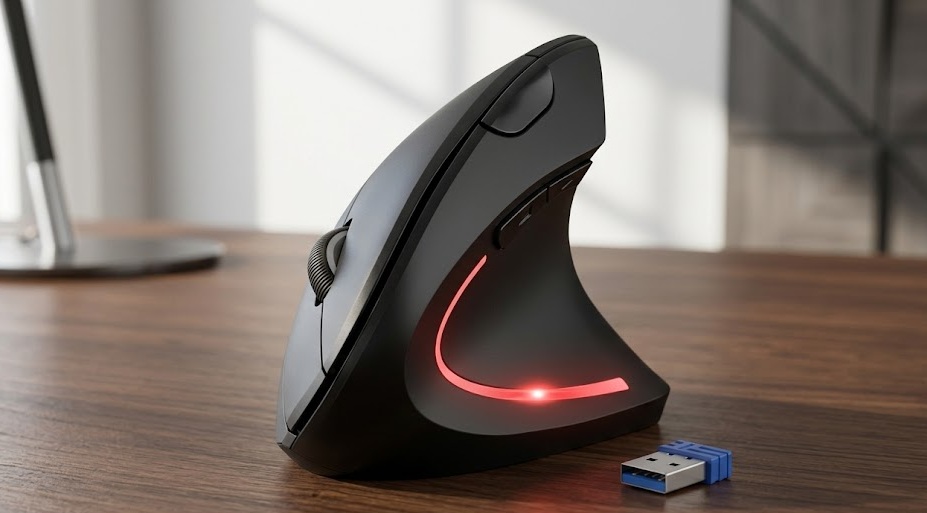 | 5-level adjustable 4800 DPI | 2.4G Wireless | 800–4800 DPI | 🛒Check Price on Amazon |
| Nulea M514 Vertical Trackball Mouse | 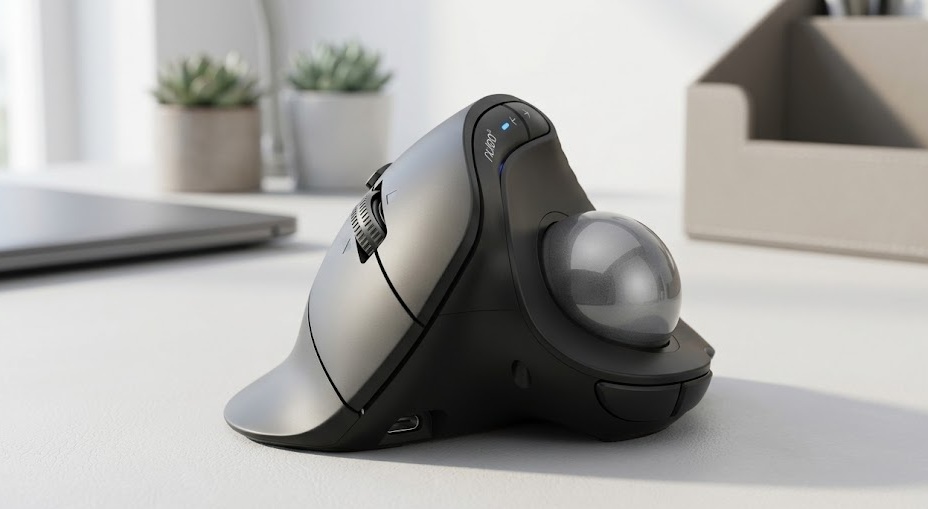 | Trackball thumb control + 3-device switch | Bluetooth & USB | 1000 DPI | 🛒Check Price on Amazon |
| Logitech Lift Vertical Ergonomic Mouse | 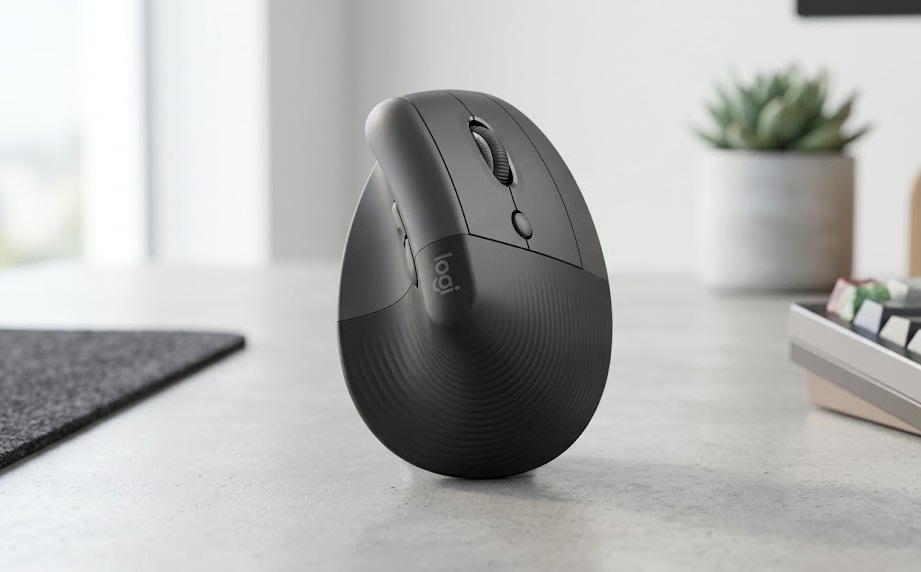 | Quiet clicks, premium brand reliability | Bluetooth / Logi Bolt | 400–4000 DPI | 🛒Check Price on Amazon |
| ProtoArc EM11 NL Ergonomic Mini Mouse | 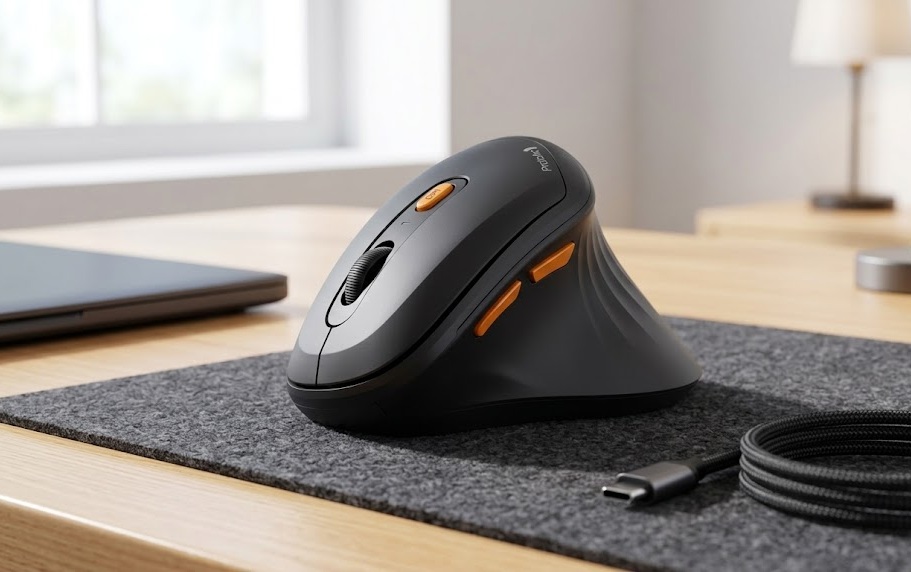 | Mini size + triple wireless connectivity | 2x BT + USB | 800–2400 DPI | 🛒Check Price on Amazon |
The 5 Best Ergonomic Mice Reviewed
1. Anker 2.4G Wireless Vertical Ergonomic Optical Mouse — Best Budget Pick for Beginners
- Best for: Anyone making the switch to ergonomic mousing for the first time — reliable, straightforward, and impressively well-priced for what it delivers.
Product Overview
If you have been curious about vertical mice but unsure whether the style will suit your working habits, the Anker 2.4G Wireless Vertical is the most sensible starting point on this list. It delivers the core ergonomic benefit — the 57-degree vertical tilt that puts the forearm in a neutral, uncrossed position — without the premium price tag that some competitors charge for the same fundamental geometry.
This is a mouse that does exactly what it promises, for a price that takes the financial risk out of the decision. With a well-established reputation on Amazon UK and thousands of verified reviews confirming its real-world reliability, the Anker is not an unknown quantity. It connects via a 2.4GHz USB nano-receiver that tucks away in the base when not in use — a small but thoughtful detail for anyone who frequently moves between home and office.
Key Features
- Three DPI settings: 800, 1200, and 1600 — switchable via an accessible button on the mouse body
- Five-button layout: Includes forward/back thumb buttons for browser navigation
- Stable Wireless: 2.4GHz wireless with USB nano-receiver; working range of approximately ten metres
- Smart Power-saving: Auto-sleep mode to extend battery life across extended periods of use
- Wide Compatibility: Compatible with Windows, macOS, and Linux — broad out-of-the-box platform support
Ergonomic Benefits
The 57-degree vertical tilt is the defining design feature here. By rotating the grip away from the conventional flat-palm position, the Anker places the forearm in a neutral stance that removes the tension from the tendons and muscles running down from the elbow. For users who are new to vertical mousing, the adjustment period is typically two to three days — after which the posture becomes second nature and the improvement in forearm comfort becomes apparent.
The three DPI settings offer practical flexibility without overcomplicating the experience. Lower DPI settings suit creative work and detailed editing; higher DPI settings are better suited to larger screens or multi-monitor setups where fast cursor travel is an advantage.
Comfort and Performance
The rubberised grip surface on the sides of the mouse provides a secure, non-slip hold throughout extended sessions. The scroll wheel is precise and tactile, with clear step increments that make scrolling through documents a controlled, comfortable experience. Button actuation force is well-calibrated — responsive enough for efficient use, but not so light that accidental clicks become a problem.
Build Quality
For its price point, the Anker is well-built. The plastic body is solid rather than hollow-feeling, with no flex or creak during normal use. The USB receiver is nano-sized, which minimises the USB profile when plugged in. Battery life is strong — most users report several months of regular daily use from a single AA battery, which is a meaningful advantage over rechargeable alternatives that require periodic downtime.
Why We Recommend It
The Anker is not the most feature-rich ergonomic mouse on this list, but it is the most accessible — and for many users, the features it omits are features they would never have used anyway. If your primary goal is to reduce wrist strain without a significant financial commitment, the Anker delivers that goal cleanly and reliably.
| Feature | Details |
|---|---|
| Brand | Anker |
| Connectivity | 2.4GHz Wireless (USB nano-receiver) |
| DPI Settings | 800 / 1200 / 1600 |
| Buttons | 5 (including forward/back) |
| Battery | 1 x AA (not rechargeable) |
| Grip Angle | 57-degree vertical tilt |
| Compatibility | Windows, macOS, Linux |
| Receiver Storage | Onboard (base compartment) |
| Colour | Black |
Pros:
- Exceptional value — the most affordable option on this list without sacrificing the core ergonomic benefit
- 57-degree vertical tilt reliably reduces forearm pronation from the first use
- Three DPI settings offer versatility for different task types and screen sizes
- Nano-receiver stores in the base — no risk of misplacing it between locations
- Strong battery life; most users report months of daily use from a single AA cell
- Broad platform compatibility — works with Windows, macOS, and Linux without additional drivers
Cons:
- Not rechargeable — requires AA batteries rather than a built-in USB-C charging solution
- Only available in right-handed configuration — not suitable for left-handed users
- Three DPI settings only — no fine-grained DPI customisation beyond the three presets
- No dedicated software for button remapping or advanced customisation
- Rubberised grip areas may show wear with intensive long-term daily use
Who Should Buy It: The Anker 2.4G Wireless Vertical is the right choice for anyone exploring ergonomic mousing for the first time, or anyone who wants a reliable, no-fuss wireless ergonomic mouse without paying a premium price. It is also a solid choice as a secondary mouse for a travel kit or a shared desk setup.
2. TECKNET Ergonomic Mouse 4800DPI — Best for DPI Control and Silent Clicking
- Best for: Users who need precise, adjustable DPI control for detailed work and want silent click feedback in shared or open-plan office environments.
Product Overview
The TECKNET Ergonomic Mouse upgrades on the basic vertical mouse formula in two meaningful ways: a five-level DPI adjustment reaching 4800 DPI and a silent click mechanism that eliminates the audible click noise of conventional mouse buttons. For anyone who works in a shared space, a home office with family members nearby, or late-night sessions where quiet operation matters, the silent click alone is a worthwhile distinction.
The six-button layout adds a DPI-switching button on the top that makes it straightforward to shift between precision settings mid-task — from detailed image editing at 800 DPI to fast multi-monitor cursor travel at 4800 DPI — without breaking workflow. The 2.4GHz USB receiver provides a stable, low-latency wireless connection within a ten-metre working radius.
Key Features
- Five-level DPI adjustment: 800, 1200, 2400, 3200, and 4800 — the highest ceiling in this comparison
- Silent click mechanism: Quiet on both primary buttons — reduces click noise by approximately 90%
- Six-button layout: Features dedicated DPI toggle and forward/back thumb buttons
- Wireless range: Stable 2.4GHz wireless with USB nano-receiver included
- Ergonomic vertical design: Contoured grip engineered for extended session comfort
Ergonomic Benefits
Like all vertical mice, the TECKNET places the wrist in a neutral, handshake-oriented position that removes forearm pronation. What sets it apart within this category is the DPI flexibility: being able to work at low DPI for precise cursor control reduces the tendency to grip the mouse tightly during detailed tasks — a habit that amplifies wrist and finger tension in conventional flat-mouse users.
The silent click mechanism is also an ergonomic consideration in a subtle way. Conventional mouse buttons require a firm, sharp actuation — particularly when users unconsciously push down harder than necessary. The quieter, softer mechanism of the TECKNET encourages a lighter touch, reducing cumulative finger and tendon strain across a full working day.
Comfort and Performance
The sculpted side grip fits the hand naturally in the vertical position, with a rubber-textured thumb rest that provides a secure hold without pressure points. The scroll wheel is smooth and precise. At 4800 DPI, cursor movement is fast and responsive — well-suited to creative professionals working across multiple large monitors where rapid cursor travel is frequently needed.
Build Quality
The TECKNET is well-constructed for its price point. The outer shell has a matte finish that resists fingerprints and feels solid to the touch. The internal mechanism behind the silent click buttons has been thoughtfully engineered to avoid the mushy, imprecise feel that plagues cheaper silent mouse designs. Battery life is competitive — standard AA-powered operation without the need for charging cables.
Why We Recommend It
The combination of five DPI levels, silent clicking, and a clean ergonomic vertical grip makes the TECKNET stand out in the mid-range price bracket. It is a mouse that has been designed with real working conditions in mind — quiet offices, varied tasks, and users who want more control over their sensitivity settings without paying flagship prices.
| Feature | Details |
|---|---|
| Brand | TECKNET |
| Connectivity | 2.4GHz Wireless (USB receiver) |
| DPI Settings | 800 / 1200 / 2400 / 3200 / 4800 |
| Buttons | 6 (including DPI toggle + forward/back) |
| Click Type | Silent (approx. 90% quieter) |
| Battery | 1 x AA |
| Compatibility | Windows, macOS, Linux |
| Colour | Black |
Pros:
- Five DPI levels up to 4800 — the highest DPI ceiling on this list
- Silent click mechanism makes this ideal for shared offices and quiet working environments
- Dedicated DPI-toggle button allows mid-task sensitivity changes without interrupting workflow
- Six-button layout with forward/back thumb buttons improves browser and file navigation efficiency
- Contoured vertical grip maintains neutral wrist posture throughout extended sessions
- Competitive price for the level of DPI control and silent operation on offer
Cons:
- Right-handed design only — not suitable for left-handed users
- Battery-powered rather than rechargeable — requires AA replacement over time
- No dedicated software or companion app for button remapping
- Silent click may feel slightly different to users accustomed to tactile conventional click feedback
- Smaller brand reputation compared to Logitech may give some buyers pause
Who Should Buy It: The TECKNET is the right ergonomic mouse for users in shared office environments, open-plan studios, or home offices where quiet operation is a priority. It is also an excellent choice for designers, photo editors, or anyone who regularly shifts between precision tasks and fast general use and needs a wide, adjustable DPI range to match.
3. Nulea M514 Vertical Trackball Mouse — Best for Multi-Device Users and Thumb-Control Precision
- Best for: Power users who work across multiple devices and want a trackball ergonomic mouse that keeps the hand completely stationary while maintaining precise, responsive cursor control.
Product Overview
The Nulea M514 takes a fundamentally different approach to the ergonomic mouse category. Where vertical mice reduce wrist strain by reorienting the grip angle, the M514 eliminates hand movement entirely: a large trackball controlled by the thumb replaces the conventional click-and-drag motion, allowing the cursor to be moved with a rolling thumb action whilst the hand and wrist remain completely still.
This is genuinely meaningful for anyone managing RSI, tendinitis, or wrist pain that is aggravated by repetitive movement — not just by grip posture. The ability to connect to three devices simultaneously (via two Bluetooth channels and one USB receiver) makes the M514 particularly compelling for professionals who regularly switch between a desktop, a laptop, and a tablet throughout the working day.
Key Features
- Thumb-controlled trackball: For cursor movement — hand stays completely stationary during use
- Triple Connectivity: Three-device connectivity via two Bluetooth channels plus one 2.4GHz USB receiver
- Ultra-fast scroll: Precision scrolling wheel for rapid document and page navigation
- Quiet clicks: Soft click buttons on primary left and right buttons — silent operation in shared spaces
- USB-C Rechargeable: Built-in rechargeable battery — eliminates the need for disposable batteries
- Wide OS support: Compatible with Windows, macOS, and Linux across all three connection modes
Ergonomic Benefits
The trackball design addresses a dimension of mouse-related strain that vertical mice alone cannot fully resolve. Even in the correct vertical grip, physically moving a standard mouse across a surface creates wrist flexion and forearm rotation with every cursor movement. The M514 removes this entirely: the hand rests in a completely static vertical position, and all cursor control is achieved through thumb rotation of the trackball.
For users with existing wrist injuries, the reduction in hand movement can be the single most impactful ergonomic change available. Many physiotherapists specifically recommend trackball mice for this reason — and the Nulea M514, as a rechargeable, multi-device option at a competitive price, is one of the more accessible entry points to trackball ergonomics available on Amazon UK.
Comfort and Performance
The trackball mechanism is smooth and responsive, with a ball surface that rolls freely without catching or stuttering. The ultra-fast scrolling wheel makes it easy to navigate long documents and pages without repeated scroll input. The quiet click buttons complement the stationary hand design — there is a consistent, pleasant calm to using this mouse across a long working session that conventional mice struggle to match.
Build Quality
The M514 is well-finished, with a premium-feeling matte body and a solid, rattle-free build. The USB-C charging port is conveniently placed. The Bluetooth pairing is reliable across all three channels, with fast switching that takes approximately one second between connected devices — fast enough to feel instantaneous in normal working conditions.
Why We Recommend It
The Nulea M514 occupies a specific niche at the intersection of ergonomic design and multi-device productivity. There is nothing quite like it at this price point on Amazon UK. If you work across multiple screens or devices and want to address wrist movement as well as wrist posture, the M514 is the most targeted and practical solution on this list.
| Feature | Details |
|---|---|
| Brand | Nulea |
| Model | M514 |
| Connectivity | Bluetooth (x2) + 2.4GHz USB Receiver |
| Device Connections | Up to 3 devices |
| Cursor Control | Thumb-controlled trackball |
| DPI | 1000 DPI (fixed) |
| Click Type | Quiet / silent |
| Battery | Rechargeable (USB-C) |
| Compatibility | Windows, macOS, Linux |
| Colour | Black |
Pros:
- Thumb-trackball eliminates hand movement — the most thorough ergonomic solution for wrist pain sufferers
- Three-device connectivity makes it ideal for professionals working across desktop, laptop, and tablet
- USB-C rechargeable — no disposable batteries required
- Quiet click buttons complement the stationary-hand design perfectly
- Ultra-fast scrolling wheel dramatically reduces the effort required for long-document navigation
- Broad compatibility across Windows, macOS, and Linux on all three connection modes
Cons:
- Trackball learning curve — most users need three to five days to develop fluid cursor control
- Fixed 1000 DPI — no adjustable sensitivity options for different task types
- Right-handed design only
- Trackball surface requires periodic cleaning to maintain smooth rolling performance
- Not suitable for gaming or tasks requiring very fast, precise cursor travel
Who Should Buy It: The Nulea M514 is the strongest choice for users with existing wrist pain or RSI who need to minimise hand movement as well as improve grip posture. It is also the standout option for professionals working across multiple devices daily — designers, writers, analysts, or anyone who hot-desks or travels between a home office and a workplace.
4. Logitech Lift Vertical Ergonomic Mouse — Best Premium Ergonomic Mouse for Daily Professionals
- Best for: Professionals who want flagship brand reliability, whisper-quiet clicking, and seamless Bluetooth or USB wireless connectivity in a well-engineered, all-day ergonomic mouse.
Product Overview
The Logitech Lift is the premium option on this list — and it earns that designation through genuine quality rather than marketing. Logitech has been designing ergonomic peripherals longer than most brands in this category, and the Lift reflects that accumulated design knowledge: it is a mouse that fits the hand intuitively from the very first session, with a build quality and feature set that holds up over years of daily professional use.
The Lift connects via either Bluetooth or Logi Bolt USB receiver — giving users the flexibility to connect without a receiver on Bluetooth-native devices, or with the ultra-reliable, interference-resistant Logi Bolt connection on devices where that is preferred. The quiet click mechanism is among the best-implemented in any wireless ergonomic mouse — firm enough for satisfying feedback, quiet enough for open-plan offices.
Key Features
- Flexible Connection: Logi Bolt USB receiver or Bluetooth — dual connection flexibility on a single mouse
- Whisper-Quiet Click: Silent-click mechanism on both primary buttons — significantly reduced click noise
- Customisable Sensitivity: DPI range of 400 to 4000, adjustable in increments for fine-grained control
- Precision Controls: Four-button layout with SmartWheel scroll and tilt-wheel capability
- Native Apple Support: Compatible with Windows, macOS, and iPadOS — including full iPadOS multi-touch support
- Aesthetics & Sizing: Available in multiple sizes (including small/medium) and sleek colour options
Ergonomic Benefits
The Lift’s vertical grip angle reduces forearm pronation in the same way as other vertical mice on this list — but the execution is more refined. The curves of the body are shaped to support the natural arch of the hand rather than simply tilting the grip sideways, meaning there are no pressure points on the palm or fingers even after several hours of continuous use. The slight forward lean of the scroll wheel positions the index finger in a relaxed, slightly bent position that reduces extension strain on the tendons.
Logitech’s own research into ergonomics informs the Lift’s design in measurable ways. Studies conducted by Logitech found that the Lift reduces muscular activity in the forearm compared to a conventional flat mouse — translating directly to less fatigue and less cumulative strain in prolonged use.
Comfort and Performance
In practical use, the Lift is the most comfortable mouse on this list over sessions of four hours or longer. The combination of a well-fitted grip, quiet buttons, and precise scroll wheel creates a working experience that simply fades into the background — which is exactly what a well-designed ergonomic mouse should do. DPI adjustments via the Logi Options+ software are smooth and precise, and the app also enables customisation of the four buttons for application-specific shortcuts.
Build Quality
Logitech’s build quality is, predictably, the best on this list. The textured rubber grip surfaces are durable, the buttons do not develop rattle or imprecision over time, and the scroll wheel mechanism is smooth and consistent. The Lift is available in graphite, off-white, and rose finishes — a thoughtful gesture toward users who care about their desk aesthetic as well as their ergonomic health.
Why We Recommend It
If you use a computer for more than five hours a day and your wrist health matters to you, the Logitech Lift is the mouse we would recommend without hesitation. It is more expensive than the other options on this list — but it is also better, in every dimension that matters for long-term daily use. The combination of Logitech’s ergonomic design expertise, quiet clicks, flexible wireless connection, and multi-year build durability makes it the most complete ergonomic mouse here.
| Feature | Details |
|---|---|
| Brand | Logitech |
| Model | Lift Vertical |
| Connectivity | Bluetooth or Logi Bolt USB receiver |
| DPI Range | 400–4000 (adjustable) |
| Buttons | 4 + scroll wheel with tilt |
| Click Type | Quiet (significantly reduced noise) |
| Battery | 1 x AA (approx. 24 months) |
| Compatibility | Windows, macOS, iPadOS |
| Software | Logi Options+ (optional) |
| Colour Options | Graphite, Off-White, Rose |
Pros:
- Premium Logitech build quality — the most durable and refined mouse on this list
- Dual connection: Bluetooth or Logi Bolt USB receiver — maximum wireless flexibility
- Quiet click mechanism is the best-implemented in this comparison — firm, satisfying, near-silent
- Logi Options+ software enables full button remapping and per-application customisation
- Available in multiple sizes and colour options — the most accommodating for different hand sizes
- iPadOS support makes it a genuine all-device ergonomic solution for Apple users
Cons:
- The highest price on this list — a meaningful premium over budget alternatives
- Right-handed version only in graphite (a left-handed version exists separately)
- Battery-powered (AA) rather than rechargeable via USB-C
- Logi Options+ software required for full button customisation — adds an installation step
- Some users report the smaller size variant (for smaller hands) feels cramped for large hand users
Who Should Buy It: The Logitech Lift is the right choice for professionals who use a mouse for long daily sessions and want the best ergonomic mouse their budget can accommodate. It is also the strongest option for Apple users on macOS or iPadOS who want native compatibility without workarounds, and for anyone who has previously found cheaper ergonomic mice uncomfortable after a few hours.
5. ProtoArc EM11 NL Ergonomic Mini Mouse — Best Compact Ergonomic Mouse for Travel and Small Desks
- Best for: Laptop users, frequent travellers, and anyone with a compact desk who wants multi-device wireless ergonomic performance in a genuinely portable, rechargeable package.
Product Overview
The ProtoArc EM11 NL challenges the assumption that an ergonomic mouse needs to be large. This is a miniaturised vertical mouse designed specifically for users who prioritise portability and multi-device flexibility — and it manages to deliver the core ergonomic vertical grip angle in a form factor compact enough to live in a laptop bag without occupying meaningful space.
The triple wireless connectivity — two independent Bluetooth channels plus a 2.4GHz USB receiver — matches the Nulea M514 in this specification and makes the EM11 genuinely useful for professionals switching between a desktop workstation, a personal laptop, and a tablet throughout the day. The built-in rechargeable battery removes the need for AA cells, and USB-C charging means the cable you already carry for your phone works for your mouse too.
Key Features
- Triple Wireless: Dual Bluetooth 5.0 channels plus 2.4GHz USB nano-receiver
- Rechargeable Battery: Quick recharge via USB-C — no disposable batteries required
- DPI Presets: Three DPI settings: 800, 1600, and 2400 — switchable via onboard button
- Compact Form Factor: Smart mini vertical design with a smaller footprint than standard ergonomic mice
- Neutral Positioning: Vertical grip angle keeps forearm aligned during use
- Multi-Platform Support: Compatible with Windows, macOS, Linux, Android, and iPadOS
Ergonomic Benefits
The vertical grip angle of the EM11 provides the same fundamental forearm benefit as larger vertical mice — neutral wrist positioning, reduced pronation, and lower tendon strain during use. What makes the EM11 unique in this comparison is that it brings these benefits to users who have previously been underserved by the ergonomic mouse category: laptop users who work on the go, hot-deskers with minimal surface space, and anyone who has found standard-sized vertical mice too large to use comfortably.
Smaller hands in particular tend to find the EM11 a better fit than larger ergonomic mice, whose contours can feel overscaled and uncomfortable for users with petite hands. If you have tried vertical mice before and found them unwieldy, the EM11 is worth reconsidering.
Comfort and Performance
For its size, the EM11 performs well. The three DPI levels cover the range needed for general laptop and desktop use, and the Bluetooth 5.0 connection is stable and low-latency. Device switching via the dedicated button on the base is clean and fast — typically under two seconds between connected devices in testing conditions. The scroll wheel is smooth and the buttons have a satisfying, accurate actuation.
Build Quality
The EM11 feels premium for its size, with a matte finish that resists fingerprints and a solid, creak-free body. The USB-C port is well-positioned and shows no signs of looseness or fragility in normal use. It is worth noting that the compact form factor does mean a slightly shallower palm rest than larger vertical mice — most users find this comfortable, but users with very large hands may prefer the full-sized alternatives on this list.
Why We Recommend It
The ProtoArc EM11 NL fills a genuine gap in the ergonomic mouse market. There are very few compact ergonomic mice that combine vertical grip geometry, triple wireless connectivity, and USB-C rechargeability in a single, portable package. For laptop users and frequent travellers, it is the most practical ergonomic mouse option available at this price point on Amazon UK.
| Feature | Details |
|---|---|
| Brand | ProtoArc |
| Model | EM11 NL |
| Connectivity | Bluetooth 5.0 (x2) + 2.4GHz USB Receiver |
| Device Connections | Up to 3 devices |
| DPI Settings | 800 / 1600 / 2400 |
| Battery | Rechargeable (USB-C) |
| Design | Mini / compact vertical |
| Compatibility | Windows, macOS, Linux, Android, iPadOS |
| Colour | Black |
Pros:
- Compact mini design — the most portable ergonomic mouse on this list
- Triple wireless connectivity (2x Bluetooth + USB) matches the multi-device functionality of the Nulea M514
- USB-C rechargeable — compatible with the chargers you already carry
- Three DPI settings cover the full range needed for laptop and desktop general use
- Broad compatibility: Windows, macOS, Linux, Android, and iPadOS
- Vertical grip delivers genuine ergonomic benefit despite the compact form factor
Cons:
- Compact size may not suit users with large hands who need a deeper palm rest
- Three DPI settings only — less flexibility than the TECKNET’s five levels
- Smaller brand recognition compared to Logitech or Anker
- Narrower review base on Amazon UK — less verified data on very long-term durability
- Right-handed design only
Who Should Buy It: The ProtoArc EM11 NL is the first recommendation for laptop users, frequent business travellers, and anyone working from a compact or shared desk who has been put off ergonomic mice by their typically large footprint. It is also a strong choice for users with smaller hands who have found standard vertical mice uncomfortable.
Buying Guide: How to Choose the Right Ergonomic Mouse for Your Needs
With five strong options reviewed above, the right choice comes down to a handful of practical considerations. Here is how to think through them.
Wrist Pain vs General Comfort
If you are dealing with diagnosed RSI, carpal tunnel syndrome, or persistent wrist pain, the Nulea M514 trackball is the most targeted solution — because it eliminates hand movement as well as correcting grip posture. If your goal is general comfort improvement rather than active pain management, any of the vertical mice on this list will deliver a meaningful benefit.
Wireless Connectivity and Device Switching
For single-device users, any of the five options here will serve well. For professionals working across multiple devices daily, the Nulea M514 and ProtoArc EM11 NL both offer three-device connectivity with fast switching — a meaningful productivity advantage that goes beyond ergonomics alone.
Session Length and Intensity
For marathon desk sessions of six or more hours, the Logitech Lift is the most comfortable option over time — its refined grip geometry and premium build quality create a mouse that genuinely fades into the background during long working days. For shorter, more varied sessions, any of the other options offer comfortable, effective ergonomic support.
Portability and Desk Space
The ProtoArc EM11 NL is the clear winner for users who need a portable ergonomic mouse for travel or compact desks. Its mini footprint and triple wireless connectivity make it uniquely suited to mobile working conditions that full-sized ergonomic mice simply do not accommodate as well.
Budget Considerations
The Anker is the most accessible starting point and delivers the core ergonomic benefit without compromise. The TECKNET adds silent clicking and five DPI levels for a modest step up. The Logitech Lift is the premium investment for users who want the best all-round ergonomic mouse the market currently offers.
Frequently Asked Questions
Is a vertical ergonomic mouse better for your wrists?
For most users, yes. A vertical ergonomic mouse reduces forearm pronation — the rotational tension created when the hand is held palm-down over a conventional flat mouse. By placing the wrist in a more neutral, handshake-oriented position, vertical mice reduce the strain on tendons and muscles that accumulates over a full working day. Independent research and widespread clinical experience support the ergonomic benefit, particularly for users already managing RSI or wrist discomfort.
How long does it take to get used to a vertical ergonomic mouse?
Most users adapt to a vertical grip within two to five working days. The initial adjustment involves retraining fine motor habits that have developed around a flat grip — this process feels slightly unfamiliar for the first few sessions but resolves quickly for the vast majority of users. Trackball mice like the Nulea M514 have a slightly longer adjustment curve, typically three to seven days.
Can an ergonomic mouse help with carpal tunnel syndrome?
An ergonomic mouse can reduce the strain patterns that aggravate carpal tunnel symptoms, but it is not a medical treatment and should not be used as a substitute for professional medical advice. Many users with early or mild symptoms report significant improvement after switching to a vertical or trackball mouse. For diagnosed carpal tunnel syndrome, we recommend consulting a physiotherapist or GP alongside any ergonomic changes to your desk setup.
Are ergonomic mice right-handed only?
Most vertical ergonomic mice — including all five options reviewed here — are designed for right-handed use. Left-handed vertical mice exist but are less widely available on Amazon UK. Trackball mice such as the Nulea M514 are more commonly available in symmetrical designs, though the M514 itself is right-handed. If you are a left-handed user, we recommend filtering specifically for left-handed ergonomic mouse designs when browsing.
Does DPI matter for an ergonomic mouse?
DPI — dots per inch — affects how far the cursor moves relative to how far the mouse is physically moved. Higher DPI means faster cursor travel; lower DPI means more precise, controlled movement. For most general office use, the default DPI settings on any of the mice reviewed here will be perfectly adequate. For design, editing, or creative work where precise cursor placement matters, a mouse with adjustable DPI like the TECKNET or Logitech Lift gives more useful control.
Should I get a rechargeable ergonomic mouse or a battery-powered one?
Both have practical advantages. Rechargeable mice (like the Nulea M514 and ProtoArc EM11 NL) are more convenient long-term and environmentally preferable. Battery-powered mice (like the Anker, TECKNET, and Logitech Lift) offer potentially longer between-charge times — the Logitech Lift in particular is rated at approximately 24 months per AA battery — and never need to be set aside to charge during the working day.
Final Verdict
All five ergonomic mice reviewed here deliver genuine wrist comfort benefits over a conventional flat mouse — but the right choice depends on how you work.
| Use Case | Recommended Pick |
|---|---|
| Best budget ergonomic mouse | Anker 2.4G Wireless Vertical |
| Best for silent office use | TECKNET 4800DPI Wireless |
| Best for wrist pain / RSI | Nulea M514 Vertical Trackball |
| Best premium all-day mouse | Logitech Lift Vertical |
| Best compact / travel mouse | ProtoArc EM11 NL Mini |
If we had to pick one recommendation for most users, the Logitech Lift is the mouse we would reach for first — its combination of refined ergonomic design, premium build quality, flexible wireless connectivity, and whisper-quiet clicking covers every dimension of what a daily ergonomic mouse should do.
For users on a tighter budget, the Anker delivers the same core vertical grip benefit cleanly and reliably without the premium outlay. And if wrist pain is already part of your working day, the Nulea M514 trackball is the most targeted solution on this list — removing hand movement from the equation entirely, and giving your wrists the break they have been waiting for.
Related Articles from Ergo Setup Lab
Building a healthy, ergonomic workspace goes well beyond the mouse. If you are looking to improve your full setup, these related guides from Ergo Setup Lab are worth reading alongside this article:
- 5 Kneeling Chairs That Actually Fix Your Posture — A detailed review of the top kneeling chairs available on Amazon UK, covering everything from budget entry-level options to solid wood premium designs.
- Top Picks for Space-Saving Support — Our guide to the best foldable ergonomic chairs in the UK, ideal for home offices, spare rooms, and flexible working environments.