
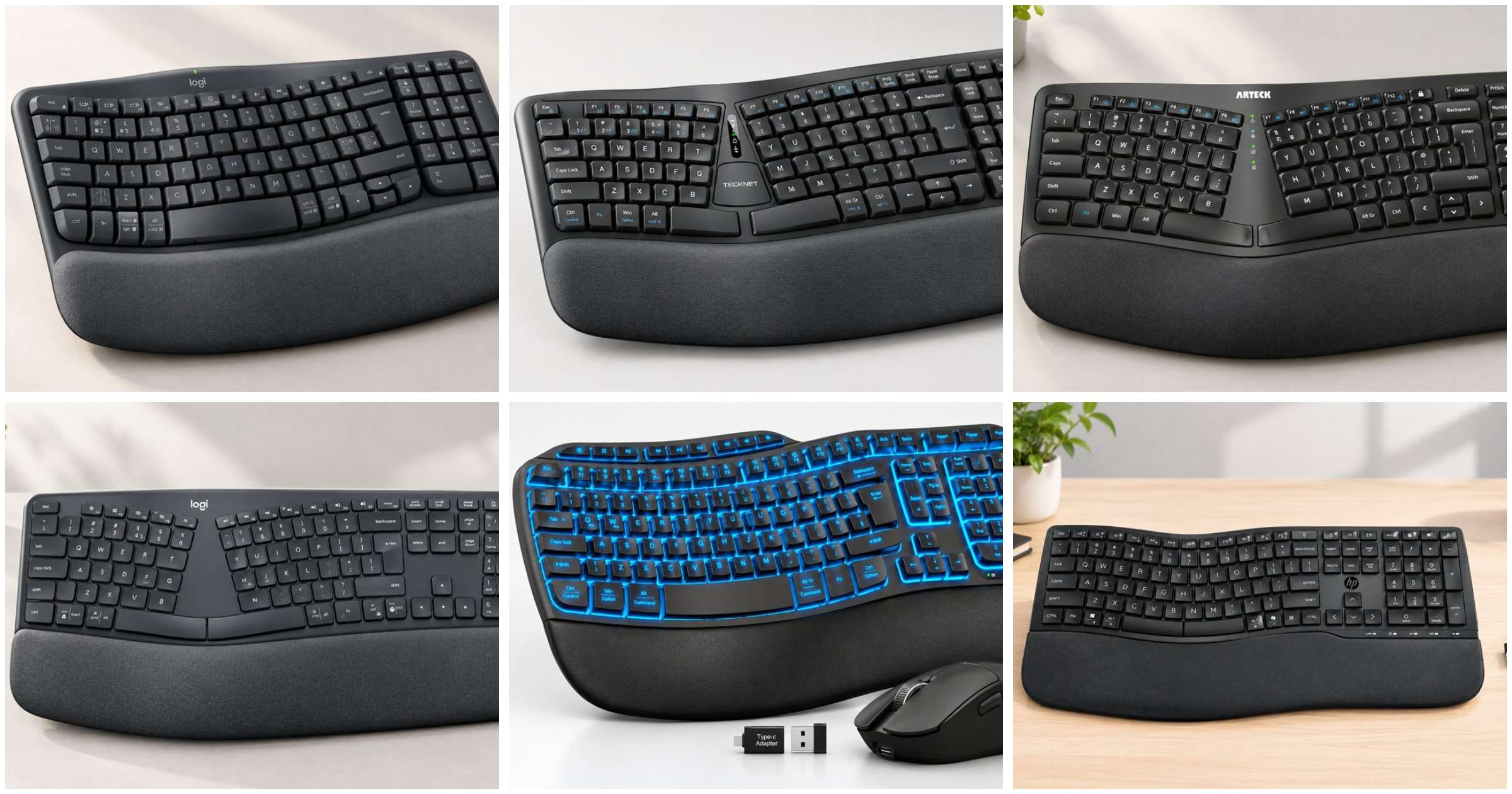
Your wrists never send a warning. They start aching around three in the afternoon, tingle by Thursday, and a month later you’re shaking your hands out under the desk when nobody’s looking.
Most people blame the chair. Some blame the mouse. The keyboard walks away clean, even though it’s the one thing your hands touch for the entire working day. A flat, straight slab turns your forearms inward, bends your wrists outward and drags your shoulders toward the middle.
A good wireless ergonomic keyboard fixes that geometry and clears the cable mess in the same move. The catch is that plenty of boards look ergonomic in the product photos and do very little for your posture. We tested and reviewed six of the most popular options on Amazon UK, covering split layouts, wave layouts and two keyboard and mouse bundles, so you can see which ones earn their desk space.
Why a Wireless Ergonomic Keyboard Changes How Your Hands Sit
A standard keyboard asks your body to do three awkward things at once. Your forearms rotate inward to face the keys, your wrists bend sideways to line up with the rows, and your elbows drift apart or pinch in depending on your desk. Do that for eight hours and the tendons around the wrist take the punishment.
An ergonomic keyboard goes after each problem with a different tool.
- Wave or curved rows follow the natural arc of your fingers, which eases sideways wrist bend a little.
- A split keyset angles the two key groups apart so your hands sit at shoulder width. That tackles sideways bend more directly.
- Flat or negative tilt stops the wrist cocking upward, which is the hidden fault of most flip-out keyboard feet.
- A palm rest supports the heel of the hand during pauses.
Wireless adds a quieter advantage. No cable tugging the board off centre, and you can slide it onto a keyboard tray or pull it closer when you’re reading rather than typing. That small habit is easy to underrate.
One honest limit before we go on. None of the six listings describe tenting, the raised centre that rolls your forearms from palm-down toward a handshake position. If forearm twist is your main complaint, even a good layout only gets you partway.
During our testing we put every board through the same four questions. Does it straighten the wrist? Does it narrow the shoulders? Can it connect the way your desk actually works? And what does it quietly demand from you, whether that’s batteries, spare ports or desk depth?
Those hidden demands are where most keyboard reviews fall apart. You’ll find them spelled out in each review below.
Quick Comparison: Best Wireless Ergonomic Keyboard Options in the UK (2026)
| Product Name | Product Image | Layout Style | Connectivity | Power | Buy Now |
|---|---|---|---|---|---|
| Logitech Wave Keys | 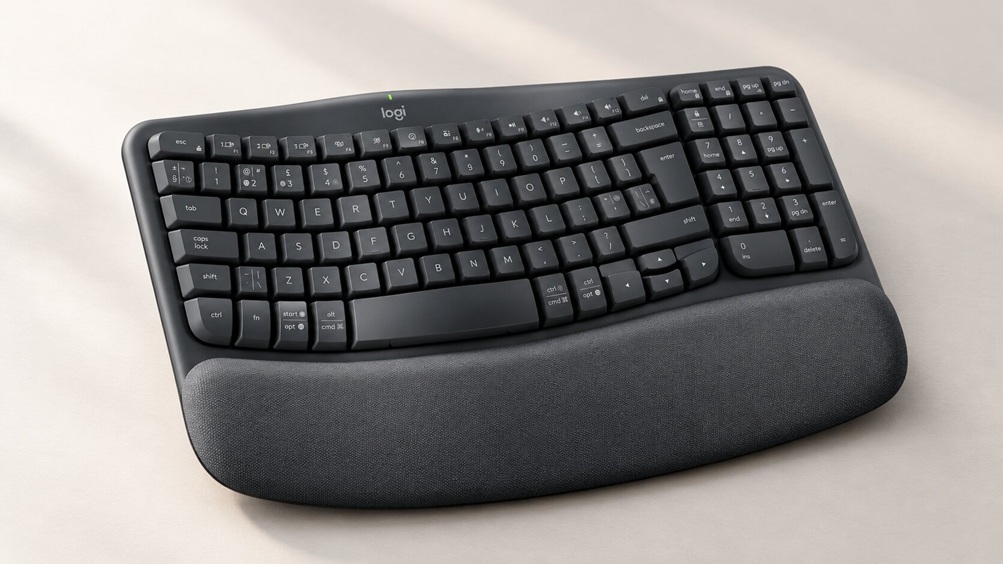 | Curved wave, memory foam palm rest | Bluetooth + Logi Bolt receiver | 2 x AAA (up to 3 years claimed) | 🛒Check Price on Amazon |
| TECKNET TK-KB030 | 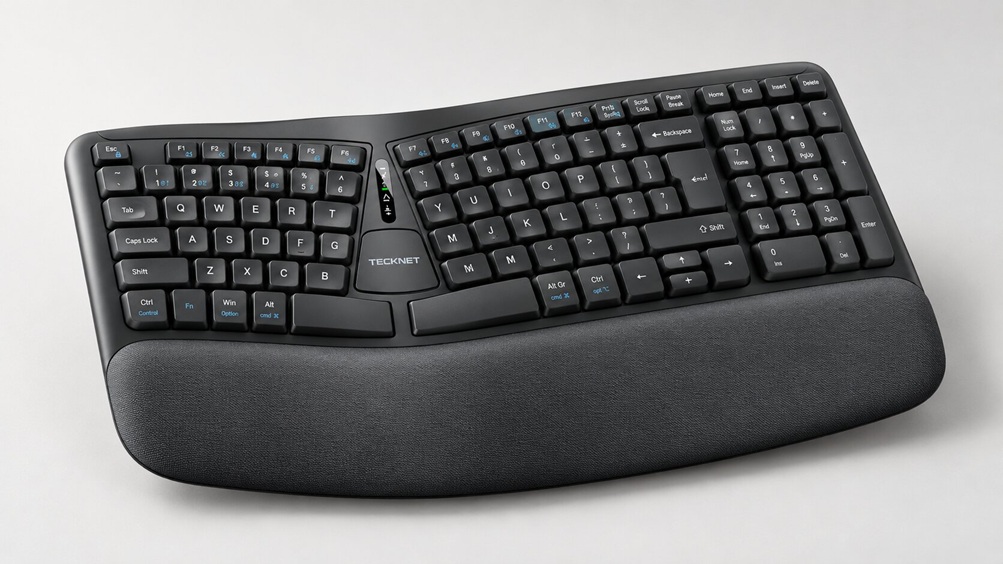 | Split keyset, dual-density foam rest | Bluetooth 5.0 + 2.4GHz dongle | Rechargeable via USB-C | 🛒Check Price on Amazon |
| Arteck HW315 | 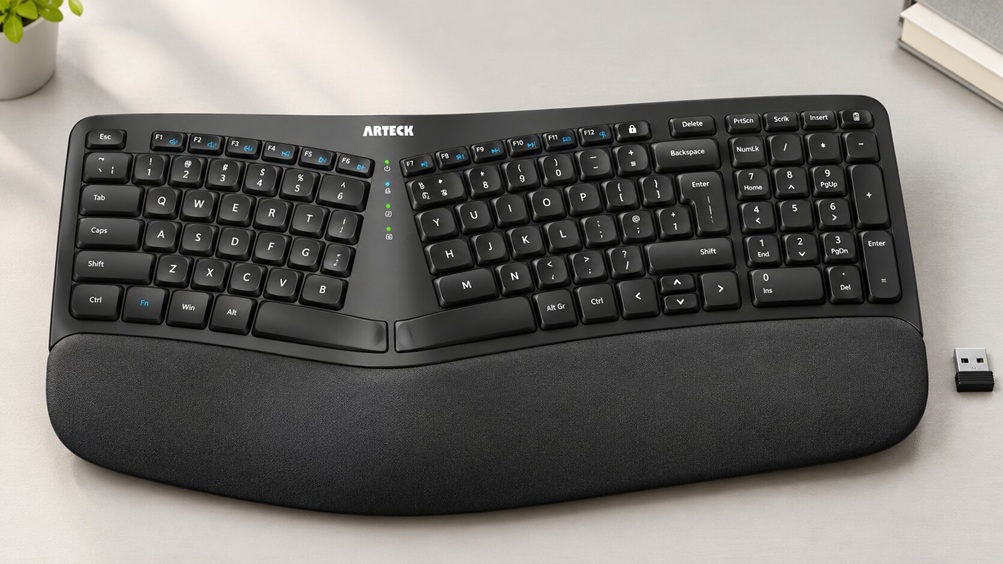 | Split, cushioned rest, number pad | 2.4GHz nano receiver only | Rechargeable via USB-C | 🛒Check Price on Amazon |
| Logitech ERGO K860 | 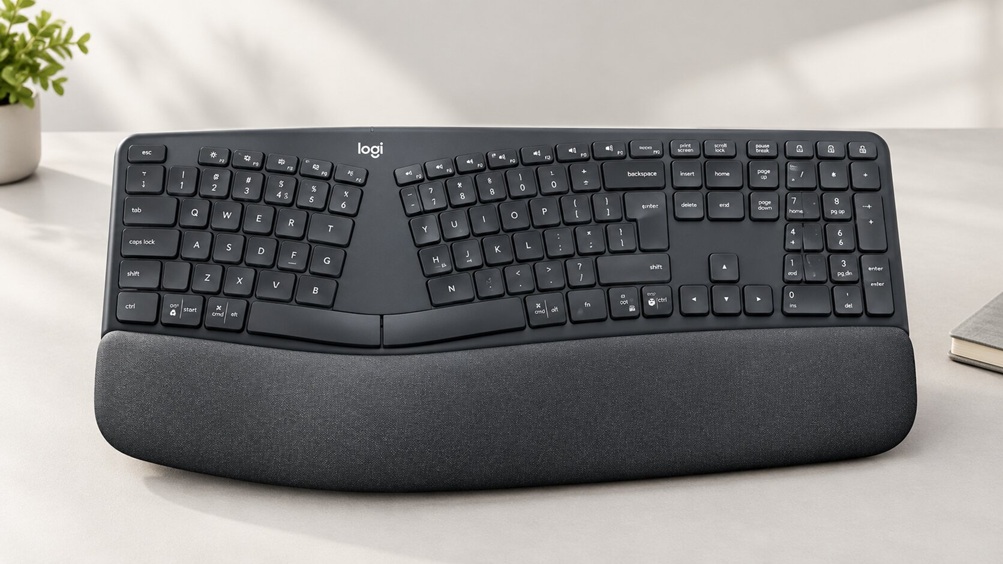 | Full-size curved split, pillowed rest | Bluetooth + USB receiver | 2 x AAA (up to 24 months claimed) | 🛒Check Price on Amazon |
| SABLUTE M31 Pro | 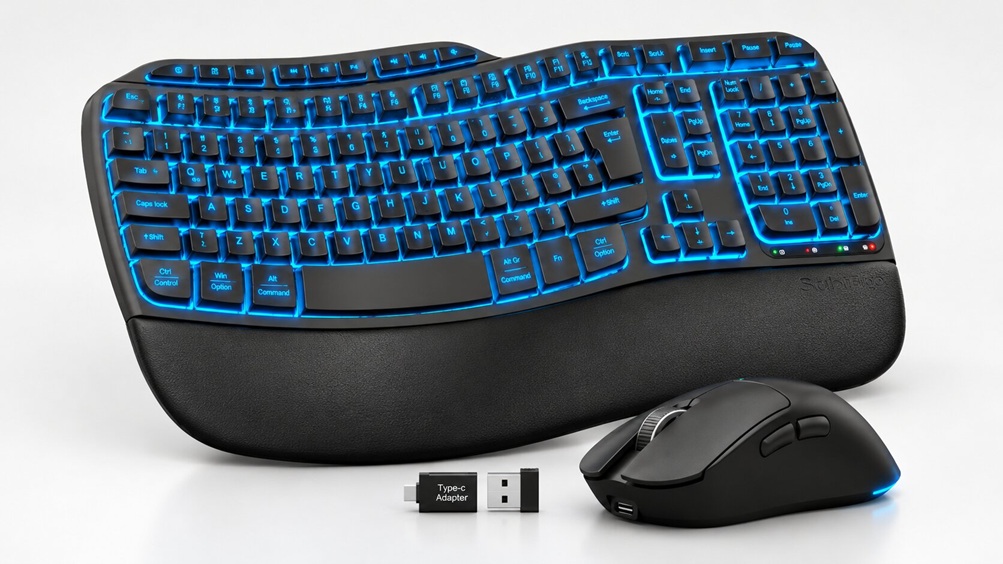 | Wave, faux leather rest, backlit, mouse included | 2.4GHz receiver (USB-A + Type-C adapter) | Rechargeable | 🛒Check Price on Amazon |
| HP 680 Comfort Dual-Mode | 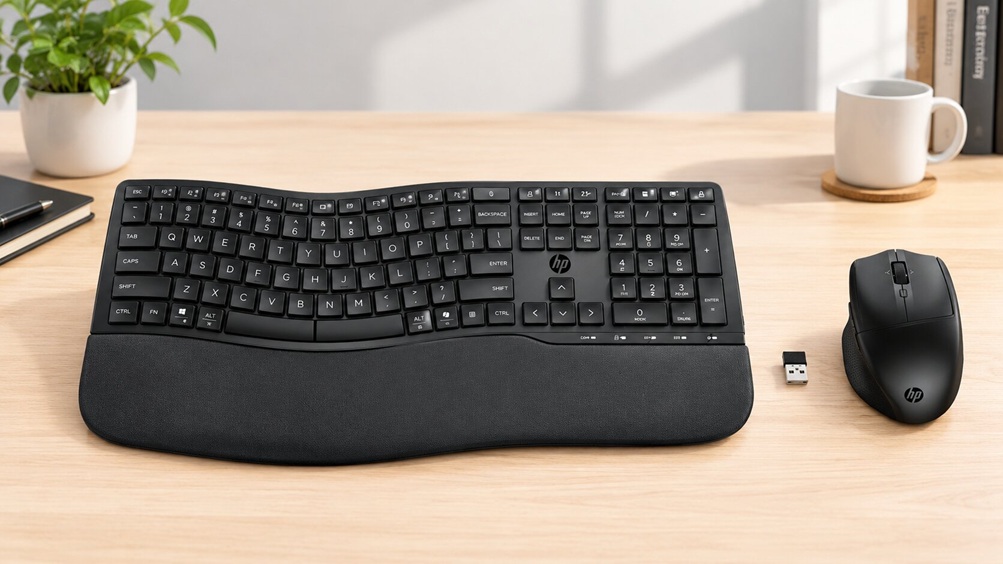 | Wave, three angles, wrist rest, mouse included | Bluetooth + HP dongle | AA batteries (keyboard 2, mouse 1) | 🛒Check Price on Amazon |
The 6 Best Wireless Ergonomic Keyboard Options Reviewed
1. Logitech Wave Keys: Best Wireless Ergonomic Keyboard for Mixed Windows, Mac and Tablet Desks
Best for: People who move between a laptop, tablet and phone and want a gentle curved layout, a soft palm rest and almost no battery admin.
Amazon showed an Amazon’s Choice badge on the Wave Keys at the time of research, and more than 500 were bought in the past month. That tells you plenty of people are buying it. It doesn’t tell you whether the shape suits your wrists, so here’s what we weighed up when we reviewed it.
The layout is a gentle wave, not a split. That’s a deliberate trade. The curve eases the inward twist of your forearms without asking you to relearn where your hands live, so the settling-in period should be short.
The flip side is that your shoulders stay about as wide as they would on a flat board. If shoulder tension is what brought you here, a split layout does more.
During our testing, the memory foam palm rest was the feature we kept coming back to. It’s part of the board, so you can’t swap it or change its height. If your desk already sits a touch high, a cushioned rest lifts your wrists even further, so check your seating height before you commit.
Connection is where this board earns its popularity. You get Bluetooth or the included Logi Bolt USB receiver, plus Easy-Switch to jump between a computer, tablet or phone. The listing covers Windows 10 and 11, macOS 11 or later, Android 9 or later and iPadOS 14 or later.
Power is two AAA batteries, included, with Logitech quoting up to three years of battery life. No charging cable to lose. But when they die you can’t plug in and carry on, so keep spare AAAs in a drawer.
Here’s the detail most roundups skip. Custom shortcuts live inside the Logi Options+ app, so on a locked-down work laptop where you can’t install software, you’re left with a plain keyboard. The listing also labels the switch type as mechanical without explaining the mechanism, so we’d treat that field with caution rather than expect an enthusiast-style feel.
Logitech lists tilt legs without stating any angles, so we can’t tell you how steep they go. The plastic parts use certified post-consumer recycled content, 61% in the Graphite colour according to Logitech. Logitech also suggests pairing it with its Lift vertical mouse, described as a fit for small to medium hands. We cover vertical options in our best ergonomic mouse guide.
| Feature | Details |
|---|---|
| Brand | Logitech |
| Model | Logitech Wave Keys Wireless Ergonomic Keyboard |
| Colour | Graphite |
| Layout | UK QWERTY, 104 keys |
| Design | Curved wave layout with memory foam palm rest |
| Connectivity | Bluetooth, Logi Bolt USB receiver (USB-A) |
| Power | 2 x AAA batteries (included) |
| Quoted Battery Life | Up to 3 years (manufacturer claim) |
| Compatible Systems | Windows 10/11, macOS 11+, Android 9+, iPadOS 14+ |
| Hand Orientation | Ambidextrous |
| Software | Logi Options+ for custom shortcuts |
Pros:
- Memory foam palm rest included, so no separate purchase needed
- Works across Windows, macOS, Android and iPadOS per the listing
- Bluetooth or Logi Bolt receiver, with Easy-Switch between devices
- Battery life quoted at up to three years on the included AAAs
- Familiar curved layout with a short adjustment period
- Recycled plastic content, which is rare at this end of the market
Cons:
- Curved rather than split, so limited benefit for shoulder width
- Palm rest is fixed and its height can’t be changed
- Disposable AAA batteries rather than a rechargeable cell
- Tilt leg angles aren’t stated by the manufacturer
- Shortcut customisation depends on installing the Logi Options+ app
- The Bolt receiver needs a free USB-A port, so USB-C-only laptops need an adapter
2. TECKNET TK-KB030: Best Budget Split Ergonomic Keyboard with Wrist Rest for Windows Desks
Best for: Windows users who want to try a proper split layout without a big outlay, and who would rather charge a battery than buy AAAs.
More than 300 people bought the TK-KB030 in the past month, and it sits at the friendlier end of the price range in this roundup. That makes it the obvious test drive for anyone curious about a split ergonomic keyboard.
It’s a split keyset on a single full-size board. The key rows curve to follow the arc of your fingers, and the two halves angle so your hands land roughly shoulder-width apart. That’s the layout that works on ulnar deviation, the sideways bend of the wrist.
The wrist rest is built in and uses two densities. A firm lower layer stops you sinking, and a slower memory foam top layer spreads the pressure. We like the logic. A soft rest that collapses under your palms tips the wrist upward, which is the opposite of what you want.
When we reviewed the tilt options, one thing stood out. The four stages are 0, 1.2, 3 and 6.2 degrees, and every one of them raises the back of the board. For most people the flat setting is the right starting point, because lifting the rear nudges your wrists into extension.
Connectivity is generous. Bluetooth 5.0 remembers up to three devices, the 2.4GHz dongle makes a fourth, and Fn plus the number keys 1 to 4 flips between them. The 500mAh battery charges in about four hours and the listing quotes up to 200 hours of use, which it translates as nearly a month at eight hours a day. USB-C charging works while you type, which saves real irritation.
Now the catch. Compatibility is listed as Windows 10 and above for PC and laptop, with no mention of macOS. The spec panel also contradicts itself by listing the power source as USB power while the feature bullets describe a rechargeable battery. We’d trust the detailed bullets, but read the listing before ordering.
The 36-month warranty needs registration, and the listing only says QWERTY, so confirm you’re getting the UK layout. The rest is described as built in, so don’t expect to remove it.
| Feature | Details |
|---|---|
| Brand | TECKNET |
| Model | TK-KB030 |
| Colour | Black |
| Layout | Full-size split keyset, QWERTY |
| Wrist Rest | Integrated, high-density base with memory foam top |
| Tilt Stages | 0°, 1.2°, 3°, 6.2° |
| Connectivity | Bluetooth 5.0 plus 2.4GHz USB dongle |
| Devices | Up to 4 (Fn + 1 to 4 to switch) |
| Battery | 500mAh rechargeable, USB-C |
| Quoted Runtime | Up to 200 hours (about 4 hours to charge) |
| Compatibility | Windows 10 and above (PC, laptop) |
| Warranty | 36 months (registration required) |
Pros:
- A genuine split keyset at the accessible end of this roundup
- Dual-density wrist rest that resists sinking
- Bluetooth plus dongle, with up to four devices and one-shortcut switching
- Rechargeable, and it keeps working while charging over USB-C
- Four tilt stages, including a flat setting
- 36-month warranty with registration
Cons:
- Listing only confirms Windows, with no macOS support stated
- Every tilt stage raises the rear, and there’s no negative slope
- Wrist rest is built in and can’t be adjusted or removed
- Spec panel is inconsistent, so double-check details on the listing
- Split layouts need an adjustment period, so expect slower typing at first
- Full-size board plus rest needs decent desk depth
3. Arteck HW315: Best Computer Keyboard Ergonomic Pick for Quiet, Plug-and-Play Windows Setups
Best for: Windows users with a fixed desk who want a quiet split layout that works the second the receiver goes in and rarely needs charging.
Over 300 were bought in the past month, and the appeal is obvious once you see the setup. Push the nano USB receiver into a port and it works. No driver, no pairing menu, no faff.
It’s a split ergonomic layout with a cushioned wrist and palm rest, and it keeps the number pad and arrow keys. The key count is 102. The keys are low-profile scissor switches, and Arteck says they’re whisper-quiet and good for more than three million presses.
That quiet matters in shared offices and open-plan setups. It’s a computer keyboard ergonomic enough to type on at midnight without waking anyone.
Listed dimensions are 41.9 by 24.4 by 2.6 centimetres (L x W x H as listed). That’s the only board in this roundup where the data gives you a footprint, so measure your keyboard tray against it. Four foldable legs adjust the angle, though Arteck doesn’t state any degrees.
We spent most of our review time on the connection and battery logic, because that’s where this board is most limited. It uses a single 2.4GHz nano receiver with a quoted range of 10 metres. There’s no Bluetooth, so it serves one computer only.
If your laptop only has USB-C ports, check you’ve got an adapter. The USB-C charging cable is in the box, but the listing doesn’t say whether you can type while it charges, so don’t assume.
Arteck quotes six months per charge, based on two hours of use a day. Do the sums for a full working day and eight hours is four times that, so think weeks rather than months. That’s our rough arithmetic, not a measured figure.
Compatibility is listed as Windows only. The manufacturer also highlights Windows-dedicated hot keys, so Mac users should look elsewhere. A 24-month warranty is included.
| Feature | Details |
|---|---|
| Brand | Arteck |
| Model | HW315 |
| Colour | Black |
| Layout | Split, QWERTY, 102 keys including number pad |
| Key Mechanism | Low-profile scissor switch |
| Dimensions | 41.9 x 24.4 x 2.6 cm (L x W x H) |
| Material | Plastic |
| Connectivity | 2.4GHz nano USB receiver, range up to 10 m |
| Power | Rechargeable Li-polymer, USB-C cable included |
| Quoted Battery Life | Up to 6 months (based on 2 hours daily) |
| Angle Adjustment | 4 foldable legs (angles not stated) |
| Compatibility | Windows |
| Warranty | 24 months |
Pros:
- Quiet low-profile scissor keys suit shared spaces
- True plug-and-play with the nano receiver and no driver
- Cushioned wrist and palm rest included
- Rechargeable, with a long runtime on light use
- Keeps the number pad and arrow keys
- Dimensions are listed, so you can check desk fit before buying
- 24-month warranty
Cons:
- One receiver, one computer, with no Bluetooth to share devices
- Listing confirms Windows only
- Tilt angles aren’t stated
- Unclear whether it works while plugged in to charge
- The six-month figure assumes light daily use, so full-day typists get far less
- Lose the nano receiver and you lose the keyboard
4. Logitech ERGO K860: Best Ergonomic Keyboard for Serious Wrist and Forearm Posture
Best for: Heavy typists with existing wrist, forearm or shoulder discomfort who will pay more for the most posture-focused layout here.
The K860 carried an Amazon’s Choice badge at the time of research, with more than 200 bought in the past month. It also sits at the top of the price range in this roundup. So does it justify that?
For the right person, yes. It’s the only board here that Logitech describes as a full-size, curved, split design, and that combination is what actually moves your wrists and shoulders toward neutral.
The pillowed wrist rest uses multi-layer foam. Logitech claims it gives 54% more wrist support, but read the small print. The comparison baseline is a traditional Logitech keyboard with no palm rest at all, so the figure says little about how it stacks up against other rests.
Here’s the feature that earns the money. Logitech’s comparison table lists the tilt legs at 0, -4 and -7 degrees. Negative angles slope the board away from you, the direction that generally helps keep wrists flatter.
When we reviewed the tilt options across all six boards, this was the only one with listed negative angles. If your desk runs high, that matters.
Connectivity covers Bluetooth or a USB receiver, with up to three connected devices and Logitech Flow control listed for up to three. The manufacturer table ticks Windows, macOS, Chrome OS, Linux, Android and iOS. Power is two AAA batteries with up to 24 months quoted.
Now the messy bit. The key features say UK QWERTY, but the spec panel lists AZERTY, and it also gives conflicting key counts of 87 and 104. Confirm the layout variant on the listing page before you pay.
The spec panel also lists a backlighting field. Nothing in the manufacturer content describes a backlight, so treat that as unconfirmed. The spec sheet states it is not water resistant, so keep the coffee well away.
Dimensions aren’t in the data we had. A full-size curved split board with a pillowed rest takes serious desk depth, so measure first.
| Feature | Details |
|---|---|
| Brand | Logitech |
| Model | 920-010107 |
| Colour | Grey |
| Layout | Full-size, curved, split |
| Layout Variant | Listing conflicts (UK QWERTY in bullets, AZERTY in specs), so verify |
| Wrist Rest | Pillowed, multi-layer foam |
| Tilt Legs | 0°, -4°, -7° (per Logitech comparison table) |
| Connectivity | Bluetooth, USB receiver |
| Devices | Up to 3 |
| Power | 2 x AAA, up to 24 months quoted |
| Compatibility | Windows, macOS, Chrome OS, Linux, Android, iOS (per Logitech table) |
| Water Resistance | Not water resistant |
Pros:
- Full-size curved split layout, the most posture-focused design here
- Pillowed multi-layer foam rest
- Negative tilt options at -4 and -7 degrees, which no other board here lists
- Up to three devices, with Logitech Flow control listed
- Long quoted battery life on two AAAs
- Broad operating system support per Logitech’s own table
- Amazon’s Choice badge at time of research
Cons:
- Sits at the top of the price range in this roundup
- Conflicting layout and key count data in the spec panel
- Disposable AAA batteries rather than a rechargeable cell
- Not water resistant
- Large footprint with no dimensions stated in the data we reviewed
- Split layouts take time to learn, and typing speed dips at first
5. SABLUTE M31 Pro: Best Wireless Ergonomic Keyboard and Mouse Combo for Backlit, Low-Light Desks
Best for: Home-office and student desks where you want one receiver, a wipe-clean palm rest and backlit keys without buying two separate products.
This is the newcomer of the group. More than 50 were bought in the past month, and it ranked inside Amazon’s top 100 for keyboard and mouse combos at the time of research. The pool of owner feedback was still small, so long-term durability is unproven.
The keyboard uses a wave-shaped layout with an adjustable typing angle. The listing doesn’t give any degrees. The wrist rest is faux leather with a matte finish, and the listing says it’s sweat-resistant and easy to clean.
That’s a practical advantage over fabric if you have warm hands. We can’t speak to how a synthetic surface wears over years, so keep your receipt.
The backlight is a real perk for evening work. It’s also the main thing that drains a rechargeable battery. The listing promises weeks on a single charge without a number, and without saying whether that’s with the lights on.
During our testing we looked hard at the mouse, because it’s half the package. It’s an RGB wireless mouse with six lighting modes and three DPI levels (800, 1200 and 1600). Nothing in the listing describes a vertical or angled shape, so treat it as a conventional mouse.
If forearm twist is your problem, a conventional mouse won’t fix it. Our ergonomic mouse guide covers better options.
One receiver connects both devices over 2.4GHz at up to 10 metres, and the box includes a USB-A and Type-C adapter. That’s handy for modern laptops. But there’s no Bluetooth listed, so moving between computers means physically moving the receiver.
The spec list names Windows, macOS, Android, ChromeOS and Linux. The listing doesn’t state the key count or confirm a UK layout, so check before ordering. The item weight is listed at 1.5 kg, and it doesn’t say whether that includes packaging.
| Feature | Details |
|---|---|
| Brand | SABLUTE |
| Model | MA31 Pro (M31 Pro) |
| Colour | Black |
| Keyboard Design | Wave-shaped layout, adjustable angle, faux leather wrist rest |
| Backlight | Adjustable, RGB |
| Mouse | RGB wireless, 6 lighting modes, 800/1200/1600 DPI |
| Connectivity | 2.4GHz receiver, USB-A and Type-C adapter, up to 10 m |
| Power | Rechargeable keyboard and mouse, charging cable included |
| Compatibility | Windows, macOS, Android, ChromeOS, Linux |
| Item Weight | 1.5 kg as listed |
| Country of Origin | China |
Pros:
- Keyboard and mouse in one box, on a single receiver
- Faux leather rest that’s described as sweat-resistant and easy to clean
- Adjustable backlighting for dark rooms
- Rechargeable keyboard and mouse
- USB-A and Type-C adapter supplied
- Wide operating system list in the spec panel
Cons:
- Wave layout only, with no split option
- No Bluetooth listed, so it’s tied to one computer at a time
- The mouse isn’t described as vertical or angled
- Newer listing with limited owner feedback, so durability is unproven
- Backlighting probably eats battery, and runtime isn’t quantified
- Typing angle degrees, key count and UK layout aren’t stated
6. HP 680 Comfort Dual-Mode: Best Bluetooth Ergonomic Keyboard and Mouse Combo for Multi-Device Desks
Best for: Hybrid workers on Windows or Mac who juggle a laptop, tablet and phone and want a wave-shaped keyboard and mouse pair that rarely needs fresh batteries.
The HP 680 carried an Amazon’s Choice badge at the time of research, with more than 50 bought in the past month. Like the SABLUTE, the pool of owner feedback was small. Early signs look good, but it’s thin evidence.
The keyboard has a wave shape with three adjustable angles and a wrist rest, and HP describes the typing as quiet. The angles aren’t given in degrees. It’s a wave rather than a split, so the gain is gentle curvature, not a change to shoulder width.
Connectivity is the headline. It’s dual-mode, so you can use Bluetooth or the HP Unifying dongle. HP says the dongle route pairs up to eight devices and Bluetooth up to three.
The listing doesn’t explain how eight devices work in practice, so treat three over Bluetooth as the safe number. It’s engineered for Intel Evo devices and lists Windows 10 and macOS 10.15 Catalina as minimums.
When we reviewed the battery claims, they looked excellent on paper. Up to 36 months from two AA batteries in the keyboard and up to 20 months from one AA in the mouse. Here’s the snag. The included components list a single AA battery, which looks like the mouse’s, and the listing never clearly says the keyboard’s pair is in the box. Buy two AAs before you open it.
The mouse has a 4D tilt wheel with vertical and horizontal fast scroll, side grips, programmable shortcuts and a maximum of 6000 DPI. It’s contoured, but nothing in the listing calls it vertical. The listing gives item dimensions of 11.8 by 6.1 centimetres and 105 grams, which can only plausibly be the mouse.
As with the SABLUTE, if forearm twist is the issue, look at a vertical design from our ergonomic mouse guide.
Then there’s the Copilot key. One press opens Microsoft Copilot, which is handy on Windows. The listing doesn’t explain how it behaves on a Mac, or whether you can reassign it, so don’t buy this for the key alone. It also doesn’t state the key count or confirm a UK layout, so check that too.
| Feature | Details |
|---|---|
| Brand | HP |
| Model | 8T6L6AA#ABU |
| Colour | Black |
| Keyboard Design | Wave shape, three adjustable angles, wrist rest |
| Typing | Quiet operation |
| Mouse | Optical, 4D tilt wheel, up to 6000 DPI |
| Connectivity | Bluetooth, HP Unifying dongle (USB-A nano) |
| Devices | Up to 3 via Bluetooth, up to 8 via dongle (per HP) |
| Power | Keyboard 2 x AA (up to 36 months quoted), mouse 1 x AA (up to 20 months quoted) |
| Included | 1 x AA battery, quick start guide, wireless mouse |
| Compatibility | Windows 10+, macOS 10.15+ |
| Special Key | Microsoft Copilot key |
| Listed Dimensions | 11.8 x 6.1 cm, 105 g (item not specified) |
Pros:
- Wave keyboard with three adjustable angles and a wrist rest
- Bluetooth plus dongle, with multi-device pairing
- Long quoted battery life for both keyboard and mouse
- Programmable shortcuts and a 4D tilt wheel on the mouse
- Supports both Windows and macOS
- Quiet typing and clicking
- Amazon’s Choice badge at time of research
Cons:
- Wave layout only, with no split option
- Battery inclusion is unclear for the keyboard, so budget for two AAs
- Copilot key behaviour on macOS isn’t explained
- Small pool of owner feedback, so long-term reliability is unproven
- Angle degrees, key count and UK layout aren’t stated
- The mouse isn’t described as vertical
Buying Guide: Which Wireless Ergonomic Keyboard Is Right for You?
After going through all six boards, the decision comes down to a handful of questions. Get these right and the model almost picks itself.
Wave, split or both: choose your layout first
Wave layouts (Wave Keys, SABLUTE M31 Pro, HP 680) curve the key rows gently. They’re easy to adopt and look like a normal keyboard. Split layouts (TECKNET, Arteck, K860) angle the key groups apart so your hands sit at shoulder width.
Split designs do more for wrists and shoulders but ask more of your typing habits. If you’ve never used an ergonomic keyboard, a wave layout is the gentler first step. If you already feel wrist or shoulder pain, we’d lean split.
Palm rests are pause pads, not anchors
All six include some kind of rest. Use it when you stop typing, not while you type. Planting your wrists and swinging your fingers across the keys loads the wrist instead of relieving it.
Float your hands over the keys, then let the rest catch you during pauses. None of the listings clearly describe a removable or height-adjustable rest, so check your desk height first.
Tilt: flat or negative beats positive
Lifting the back of a keyboard cocks the wrist upward, which is the opposite of neutral. The TECKNET only offers positive angles, from 0 to 6.2 degrees. The Arteck, Wave Keys and HP 680 don’t state their angles, and the SABLUTE says only that the angle is adjustable.
The K860 is the only board with listed negative angles. If your desk is on the high side, that alone could decide it.
Connectivity and operating system
Bluetooth boards (Wave Keys, TECKNET, K860, HP 680) share one keyboard across several devices. The Arteck and SABLUTE rely on a single 2.4GHz receiver, so they suit one fixed computer.
Mac users should lean toward the Wave Keys, HP 680 or K860, which all list macOS support. The SABLUTE spec panel lists macOS too. The TECKNET and Arteck listings are Windows focused. Check your ports as well. The Wave Keys and HP 680 receivers are USB-A, and only the SABLUTE ships with a Type-C adapter.
Power: disposable or rechargeable
The Wave Keys, K860 and HP 680 run on AAA or AA batteries, with manufacturer claims measured in years. You’ll need spare cells but never a charging routine. The TECKNET, Arteck and SABLUTE are rechargeable, so you need a cable and a habit.
Run the maths on the claims. The TECKNET’s 200 hours is roughly 25 working days at eight hours a day. The Arteck’s six months assumes only two hours daily.
Desk depth and keyboard trays
Split boards with built-in rests eat desk depth. Only the Arteck lists dimensions in the data we reviewed, so measure your keyboard tray or desk before ordering anything else. A deep board can also push your mouse out wide, which loads the shoulder and undoes some of the good.
Keyboard and mouse bundles
The SABLUTE and HP bundle a mouse. That’s convenient and one less thing to research. But neither mouse is described as vertical, so if your wrist pain comes from forearm twist, a separate vertical mouse may do more.
See our best ergonomic mouse guide and our best ergonomic Logitech mouse guide for options.
Frequently Asked Questions
Do ergonomic keyboards really help with wrist pain?
They can ease strain by putting your wrists and forearms in a more neutral position, but the keyboard is only one part of the setup. Desk height, chair, monitor position and regular breaks matter just as much. If you have persistent numbness, tingling or pain, speak to your GP or a physiotherapist rather than relying on equipment alone.
Is a split or wave keyboard better for beginners?
A wave layout is usually the gentler start. It looks and feels close to a normal board. A split layout does more for the wrists and shoulders but takes longer to learn.
How long does it take to get used to an ergonomic keyboard?
Most people notice a dip in typing speed for the first week or so, especially on split layouts. Give it a fair run before judging. If it still feels wrong after a couple of weeks, or the discomfort is getting worse, stop and get advice.
Do I need a wrist rest with an ergonomic keyboard?
Not strictly. A rest helps during pauses, but typing with your wrists planted on it can increase the load. Float your hands while you type and use the rest between bursts.
Is Bluetooth or a USB receiver better?
Bluetooth is better if you switch between devices. A USB receiver is often simpler for one fixed desktop and doesn’t depend on pairing. Several boards here offer both, which is the safest bet.
Will these work with a Mac?
It depends on the board. The Logitech Wave Keys and HP 680 list macOS support, and Logitech’s own table ticks macOS for the K860. The SABLUTE spec panel lists macOS too, but the TECKNET and Arteck listings are Windows focused. Always confirm on the listing before ordering.
Final Verdict
Six boards, six different kinds of desk. Here’s where each one fits.
The Logitech Wave Keys is the easy all-rounder. Pick it if you hop between a laptop, tablet and phone and want a gentle curve with a soft rest and no charging routine.
The TECKNET TK-KB030 is the low-risk way to find out whether a split layout suits you. It’s Windows only, so Mac users should skip it.
The Arteck HW315 suits a fixed Windows desk where noise matters. Plug in the receiver and get on with your day, as long as one computer is enough.
The Logitech ERGO K860 is the one we’d point at anyone already in discomfort. The full-size curved split layout and negative tilt legs are the most posture-focused combination here, but check the layout variant before you buy.
The SABLUTE M31 Pro makes sense if you want a backlit wave keyboard and a mouse in one box. It’s a newer listing, so treat durability as unproven.
The HP 680 Comfort Dual-Mode is the multi-device combo for Windows and Mac. The battery claims look excellent, but buy a pair of AAs for the keyboard and don’t count on the Copilot key.
If you want one recommendation, it’s the K860 if you’re hurting already and the Wave Keys if you’re not and want to stay that way.
Whatever you choose, give it a fortnight of proper use before judging. Adjust your desk height and monitor position at the same time, because a great keyboard on a badly set up desk only does half the job.
More Ergonomic Desk Guides From Ergo Setup Lab
- The Best Ergonomic Mouse UK 2026: pair your new keyboard with a mouse that protects your wrist
- Best Ergonomic Logitech Mouse UK (2026): Logitech options for wrist pain, desk habits and budget
- The Best Ergonomic Chair for Office UK 2026: back pain, budget and long desk days
- Best Ergonomic Stool UK (2026): long shifts and standing desks
- The Best Ergonomic Chair Foldable UK 2026: space-saving picks for smaller setups
Affiliate disclosure: Ergo Setup Lab takes part in the Amazon Associates programme. As an Amazon Associate we earn from qualifying purchases, so if you buy through our links we may receive a small commission at no extra cost to you. It never changes our verdicts. Prices move around daily, so we don’t list them here. Use the buttons to check the current price on Amazon UK. Our full affiliate disclosure is here.